Best client-side security tools in 2026
Thirteen tools for PCI DSS 6.4.3 and 11.6.1 and Magecart protection, each with genuine pros and cons. We publish one of them and say so.
TL;DR
Best client-side security tools
WHAT THESE TOOLS DO
Inventory the scripts on your payment pages, detect when they change, and in most cases block the ones that misbehave. PCI DSS 6.4.3 and 11.6.1 made this mandatory in March 2025.
THE MAIN SPLIT
Dedicated tools, CDN and WAF modules bundled with a platform you may already have, and scanners that need no code change.
THE COMMERCIAL REALITY
Almost nobody in this category publishes pricing, which makes comparison expensive and slow.
Short on time? If you are already on Akamai, Cloudflare, Imperva or F5, check what you are paying for first. Every comparison.
What is the best client-side security tool?
The best client-side security tool depends on whether you can add a tag to your payment pages, whether you already pay for a CDN that includes a module, and whether your assessor requires a control that can block rather than only observe. Those three questions eliminate most of the list quickly. If you cannot add a tag, you need a scanner and the choice narrows to two. If you already pay for Akamai, Cloudflare, Imperva or F5, their own module may cost little or nothing extra and is the obvious first thing to evaluate. If your assessor will not accept a control that cannot block, scanners are out. What follows is the full list with genuine pros and cons for each.
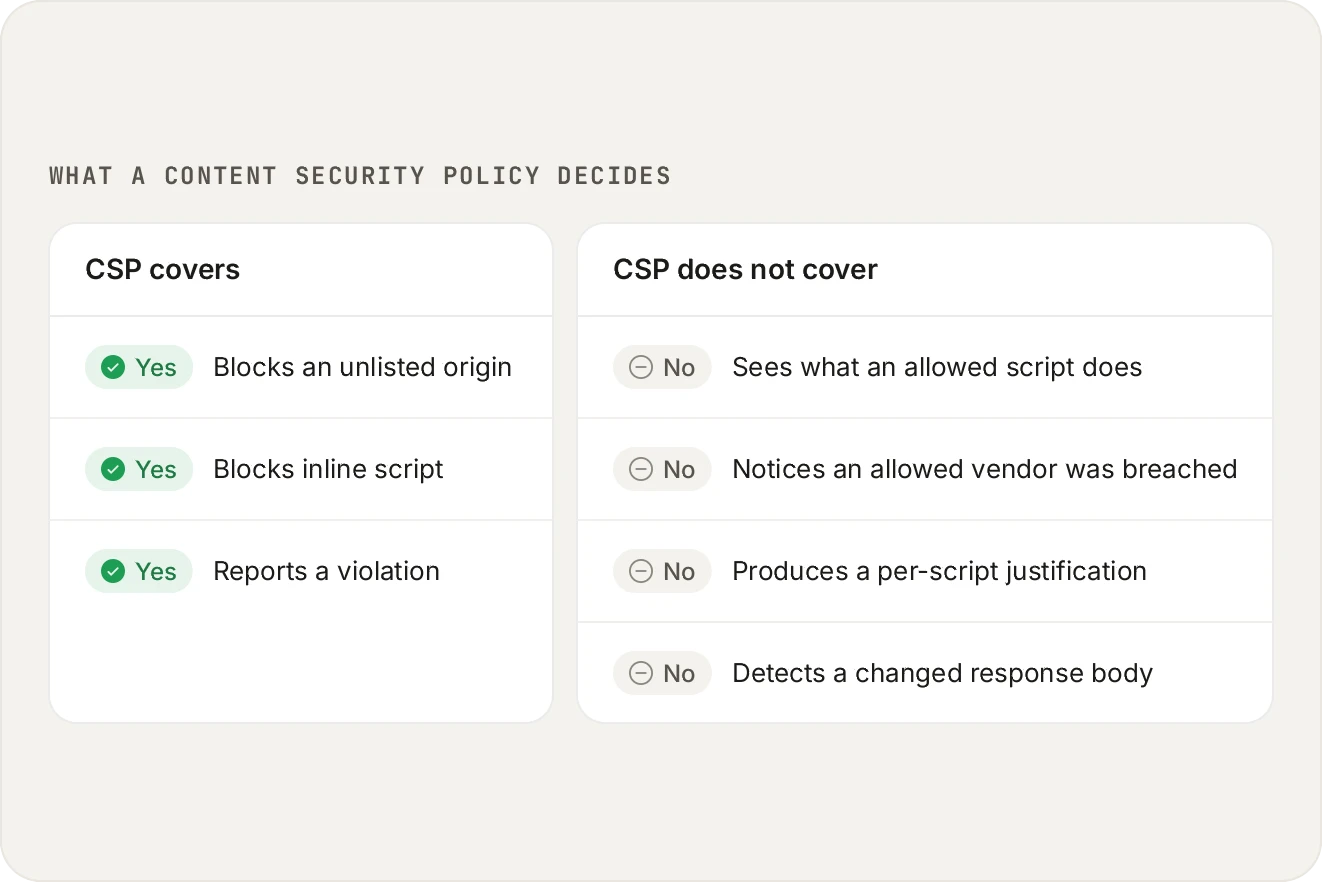
CSP is an origin allowlist. It decides where a script may load from, never what the script does once it is allowed. Both controls are useful, and they are not the same control.
Disclosure
We publish this list and we sell one of the products on it. We have put ourselves first, and the reason we give is checkable rather than a matter of taste: we publish our pricing and offer a free plan, which most of this category does not. Every other tool gets a genuine "best for" and a real limitation, and several of them are the right answer for constraints we do not serve well. If you only read one section, read the one for the product closest to your situation rather than the one at the top.
How we assessed these
Criteria: coverage model (real sessions or scheduled scans), whether it can block or only report, whether the 6.4.3 and 11.6.1 evidence is separated the way assessors ask, deployment effort, and whether pricing is published. All assessments are based on publicly available information, and where something should be confirmed with the vendor we say so rather than guessing.
Dedicated client-side security tools
1. Script Monitoring
Best for: Teams whose driver is PCI DSS 6.4.3 and 11.6.1 evidence, who want published pricing and a free plan.
Pros
Published pricing and a permanent free plan, which few others in this category offer
6.4.3 and 11.6.1 kept as two separate records, which is how assessors test them
Reports from 100% of sessions with no sampling
Blocking at four granularities, including removing a single capability from a script you keep
Page views are the only metered unit, so an accurate inventory never costs more
Cons
Covers two PCI requirement families out of twelve. Not a full-scope GRC platform
Web only. A native mobile app checkout is outside what a browser tag can observe
Requires adding a tag, so it is not an option if that is organisationally impossible
We publish this. Rank it accordingly, and use the free plan to check the claims rather than taking our word for them.
2. Source Defense
Best for: Teams who want to constrain what third-party scripts can do rather than observe what they did.
Pros
A genuinely different architecture: sandbox plus a permissions model per script
Mature product with deep enterprise and QSA experience
QSA-validated client-side controls
Granular per-script permissions map neatly onto the 6.4.3 authorisation requirement
Cons
A sandbox changes the execution environment, so some vendor scripts need configuration work
Webhooks, a REST API and SIEM export are Enterprise-only
Essentials covers one domain and two payment pages, and no human support below Professional
Browser-based detection carries the same caveat as any in-page agent
The strongest architectural idea in the category. Choose it if constraining capability appeals more than observing behaviour and you have engineering time for the integration.
3. Jscrambler
Best for: Teams who also need JavaScript obfuscation and code protection for their own application.
Pros
Best-in-class JavaScript obfuscation and code protection, which nobody else here competes with
Long track record and a substantial engineering team
Webpage Integrity adds decoy-based detection on top of the code protection product
Strong presence in regulated industries
Cons
Trap-based detection runs in the page, so the detection logic is visible to anything else there
AI analysis features have relied on third-party model APIs, hence opt-in. Check your data governance
You are buying into a platform built primarily around code protection
Quote-based pricing
The clear choice if code protection is a requirement alongside client-side security. Less obviously the choice if PCI evidence is the only driver.
4. Feroot
Best for: Teams whose problem spans PCI, privacy and healthcare tracking rather than PCI alone.
Pros
The best educational content in the category, genuinely worth reading whoever you buy from
Strong privacy and HIPAA positioning, which most PCI-focused tools ignore entirely
Inspector and PageGuard cover discovery and enforcement as separate mature products
A tracker database mapping known third-party scripts to behaviour and ownership
Cons
Detection is in-browser agent based, with no server-side payload analysis
Session coverage is sampled at 10% of sessions, so nine in ten are never inspected
PCI evidence is one priority among several given the breadth
Quote-based pricing
Pick Feroot if healthcare privacy or consent governance sits alongside PCI in your requirements.
5. Reflectiz
Best for: Organisations that genuinely cannot add a tag to their payment pages.
Pros
No code change at all, which is decisive where adding a tag is a multi-month process
Fast to deploy because there is nothing to deploy
Good breadth of analysis on what it can see
Strong research output on OWASP topics
Cons
Scans run from cloud infrastructure on a schedule, which is not the session a real customer had
No coverage between scans
Observes but does not block, and some assessors do not accept that for 6.4.3
Quote-based pricing
The right answer when a tag is impossible. Confirm with your assessor first that a scanner is acceptable, because that is the question that decides it.
6. otto-js
Best for: Smaller teams wanting script and consent monitoring without an enterprise platform.
Pros
Consent and privacy monitoring treated as first-class rather than an afterthought
Lighter and more approachable than the enterprise platforms here
Focused on the script layer without a large surrounding suite
Cons
Smaller install base, which matters if procurement weights vendor scale
Less public material on PCI evidence workflows specifically
Quote-based pricing
Worth a look if you want combined consent and script monitoring at a smaller scale.
The fastest comparison is your own checkout, on a free plan.
CDN, WAF and network platform modules
If you already pay for one of these platforms, start here. The marginal cost is often zero, and a control you already own beats a better control you have to buy.
7. Cloudflare Page Shield
Best for: Existing Cloudflare customers on any plan.
Pros
Script monitoring is included on every plan, so a first look costs nothing extra
Excellent developer experience and documentation
Script and connection monitoring with CSP reporting in a dashboard your team already uses
Backed by visibility across a very large share of web traffic
Cons
Requires your traffic to be on Cloudflare
Code-change alerts need Client-Side Security Advanced, a paid add-on above every plan including Enterprise
Content security rules read zero on Free through Enterprise, and five on Advanced
Script data comes from a sample of responses rather than every session
If you are on Cloudflare, evaluate this before buying anything else. The base tier, renamed Client-Side Security in March 2026, is on every plan, and the PCI tier, Client-Side Security Advanced, is self-serve at $0.099 per 1,000 requests.
8. Akamai Page Integrity Manager
Best for: Existing Akamai customers consolidating vendors.
Pros
One contract, one vendor review, one support relationship if Akamai already fronts your traffic
Threat intelligence across an enormous traffic footprint
Enterprise support and procurement maturity
Integrated with the wider Akamai security portfolio
Cons
Effectively requires being an Akamai customer, and is impractical if you are multi-CDN
Bundled enterprise pricing makes the marginal cost hard to establish or compare
One module in a very large portfolio
No self-serve evaluation
The obvious choice for Akamai customers, and rarely the reason to become one.
9. Imperva Client-Side Protection
Best for: Existing Imperva customers wanting client-side and server-side in one console.
Pros
Genuinely good published guidance on 6.4.3 and 11.6.1, worth reading regardless of what you buy
Integrated with a mature WAF and application security suite
Enterprise compliance and procurement maturity
Cons
Most valuable if you already run Imperva
Quote-based enterprise pricing
No self-serve evaluation path
Competes for roadmap attention within a broad portfolio
Sensible for Imperva customers. A large platform to adopt for one control otherwise.
10. F5 Client-Side Defense
Best for: Existing F5 Distributed Cloud customers.
Pros
Strong fit where F5 already sits in your application delivery path
Enterprise-grade detection backed by substantial security research
Integrates with wider F5 Distributed Cloud services
Cons
Realistically an F5 customer product
Quote-based enterprise pricing negotiated inside larger agreements
No self-serve trial
Heavier deployment if you are not already on the platform
Consolidation play for F5 customers.
11. DataStealth
Best for: Organisations that cannot add JavaScript under any circumstances and want data-layer capabilities.
Pros
No code change, because the work happens in the traffic path
Enables tokenisation and redaction alongside script visibility
Established in regulated sectors
Cons
Requires routing your site traffic through their infrastructure, which is a significant architectural commitment
Becomes a dependency for your site being reachable, not just for monitoring working
A network-layer view infers in-browser behaviour rather than observing it directly
Quote-based pricing
A real option when no tag is possible and you want data-layer controls. Weigh the availability dependency carefully.
12. Trusted Knight
Best for: Financial services teams for whom a DNS change is easier than a page change.
Pros
Long track record in financial services and banking fraud
Deployment without touching the page
Protection model informed by years of banking malware research
Cons
A DNS-proxy model means a DNS change and a third party in the resolution path
No publicly shown QSA validation for 6.4.3 or 11.6.1
Quote-based pricing
Smaller public footprint of recent technical material
Worth considering if their financial services heritage matches your environment.
CSP and scanning tools
13. Report URI
Best for: Anyone deploying or tuning a Content Security Policy.
Pros
The best tool available for CSP reporting, built by people who know the spec deeply
Transparent, developer-friendly, publicly priced
Handles other browser reporting endpoints too
Honest positioning: they do not claim to be a PCI product
Cons
Reports on policy violations only, so it says nothing about scripts your policy permits
A compromised but allowed vendor generates no violation at all
No script inventory or business justifications, so it does not produce 6.4.3 evidence
No blocking beyond what your CSP enforces
Complementary rather than competitive. If you are deploying a CSP we would recommend it, and you will still need something for 6.4.3.
14. DomDog
Best for: Smaller teams wanting lightweight scanning plus CSP management.
Pros
Accessible and straightforward for teams who find enterprise platforms oversized
Combines scanning with CSP management
Lower commitment than the enterprise options
Cons
Scanner coverage limitations apply: a scheduled external view is not a real session
Small public footprint with limited independent technical material
Verify the output meets your assessor's expectations
Business is $999 a year, covering one domain and two payment pages
Reasonable lightweight option if scanning coverage suits your risk profile.
Questions to ask any vendor
Every detection approach has blind spots, including ours. These questions get to them quickly, whichever product you are evaluating:
What happens if a script overrides fetch or XMLHttpRequest? Any script on the page can replace the browser's built-in functions. If a tool's own alerts travel through them, a hostile script can quietly swallow the alert.
Does anything run before the tool is ready? Approaches that register late, such as service workers, can miss requests made before registration, and any script can unregister a service worker.
Where does the verdict come from? Products that judge scripts by URL or domain reputation depend on threat feeds, which often flag a malicious domain only after it has been reported publicly.
What does it report when it cannot fetch a script? If a tool re-fetches scripts to analyse them, ask what happens when a script was single-use or served only to real visitors. A silent failure looks exactly like a clean result.
Does it see the session a real customer had? A payload written to fire for one country or one card range will not show itself to a visit from a datacentre IP on a schedule.
Choosing quickly
If this is true
Look at
You are already on Cloudflare
Client-Side Security first, priced at $0.099 per 1,000 requests
You are an Akamai, Imperva or F5 customer
Their bundled module first, for the same reason
You cannot add a tag to the payment page
Reflectiz, or DataStealth if routing is acceptable
Your assessor requires a control that can block
Anything except the scanners
You also need code protection
Jscrambler
Privacy and HIPAA sit alongside PCI
Feroot
You want to constrain capability, not observe it
Source Defense
You want published pricing and a free plan
Script Monitoring, which is ours
You are deploying a CSP
Report URI, alongside something else
Sources and methodology
PCI DSS requirement text is quoted from PCI DSS v4.0.1 (June 2024), published by the PCI Security Standards Council, which is the current version at the time of writing. Requirements 6.4.3 and 11.6.1 became mandatory on 31 March 2025. Where we describe a competitor, we describe publicly available information and say so when something should be verified with the vendor. We publish this product and that is a bias worth knowing about while you read.
ASK AN AI
Don’t just take our word for it
Ask your assistant what to look for in a tool for PCI DSS 6.4.3 and 11.6.1.
Frequently asked questions
There is an honest answer and it is not a single product. It depends on whether you can add a tag, whether you already pay for a CDN that bundles a module, and whether your assessor accepts a control that cannot block. Those three questions eliminate most of the list.
Only a few: ours, Report URI, DomDog and Source Defense. The rest are quote-based, which makes genuine comparison slow and expensive and is worth factoring into your evaluation timeline.
Yes, if PCI DSS 6.4.3 applies to you. A CSP produces no inventory, no per-script justification and no integrity assurance, which are the three things the requirement asks for.
Often yes, and they are the first thing to check if you already pay for the platform. Verify the feature tier you actually have, and confirm the evidence output matches what your assessor expects.
Sometimes, and it is the question to settle before buying. Some assessors accept scanning; others do not accept a control that cannot block. Ask yours directly rather than discovering it at assessment.
Several make validation claims and the two we can speak to directly are Source Defense and ourselves. Ask any vendor for specifics rather than accepting the phrase, because it is used loosely.
Yes, and it is common during a migration. Running two client-side tools permanently adds page weight, so be deliberate about which is the system of record for your PCI evidence.
It varies by architecture: a tag-based tool is minutes to install and days to tune. A sandbox needs configuration per vendor script. A network-layer product needs a routing change. Scanners are fastest to start and weakest in coverage.
No. Every tool on this list addresses the client-side requirements, 6.4.3 and 11.6.1. The other ten requirement families need a full-scope platform or your QSA's process. See best PCI compliance software.
A fair question, and the honest answer is: verify it. We have stated our bias, given every competitor real strengths, named the situations where they beat us, and published our pricing so the one claim we rank ourselves on is checkable. Read the sections for the products closest to your constraints rather than the one at the top.
They suit different constraints. Reflectiz is agentless: it scans your pages from its own infrastructure, so it is the one to pick if you cannot add a tag to the payment page, at the cost of seeing a scheduled visit rather than real customer sessions. Jscrambler comes from JavaScript code protection and runs in the page, which suits teams who also want to protect their own code. Feroot runs in-browser agents and publishes widely cited PCI guidance. None of the three publishes pricing, so compare them on quotes, on whether they observe real sessions, and on the evidence export your assessor will accept.
Start by removing every script your checkout does not need, because that shrinks the job whatever you buy. Then pick by constraint rather than by feature list: if you are on Cloudflare, price its Client-Side Security Advanced tier first; if you can add a tag, the tools with free plans let you see your real inventory before paying, including Script Monitoring at 1,000 payment-page views a month; if you cannot add a tag, you need a scanner such as Reflectiz. For a small store, published pricing and a free plan usually matter more than threat-intelligence depth.
Related articles
Comparisons
Does Cloudflare make you PCI compliant?
What the WAF, the CDN and Page Shield each do for 6.4.3 and 11.6.1, and what they leave with you.
Comparisons
Best PCI compliance software in 2026
Full-scope platforms and client-side tools are different categories. Both lists, kept apart.
Comparisons
Jscrambler pricing: what is published, and what is not
No public figures, what drives a quote, and what to ask for on the call.
PCI DSS
PCI DSS compliance: a practical guide for 2026
What the standard covers, what changed in v4.0.1, and where the two client-side requirements fit.
See every script on your own checkout.
Install the tag, mark your payment pages, and watch the inventory fill in. Free forever on 1,000 page views a month, no credit card.
Free forever plan. No credit card.