What is web skimming?
The technique, the exfiltration methods, and why your logs show a perfectly successful checkout while the card is being copied.
TL;DR
Web skimming
ONE TECHNIQUE, SEVERAL NAMES
Web skimming, e-skimming and digital skimming are the same thing. Magecart names the actors; formjacking names the mechanism.
HOW IT WORKS
A script listens to the payment form, or replaces it, and copies values as the customer types.
HOW IT LEAVES
Usually disguised: an image request with data in the query string, a beacon on page unload, a WebSocket, or a fetch to a lookalike domain.
Short on time? The purchase completes normally, which is the entire point of the design.
What is web skimming?
Web skimming is an attack in which malicious JavaScript on a checkout page copies payment card details as the customer enters them and transmits the data to a server controlled by the attacker. It is the digital equivalent of a physical card skimmer fitted over an ATM reader. The same technique is called e-skimming in PCI SSC and FBI advisories, digital skimming in analyst reporting, and formjacking when the emphasis is on the mechanism. Because the card is read and transmitted entirely within the browser, the theft produces no failed transactions and no unusual traffic to your infrastructure.
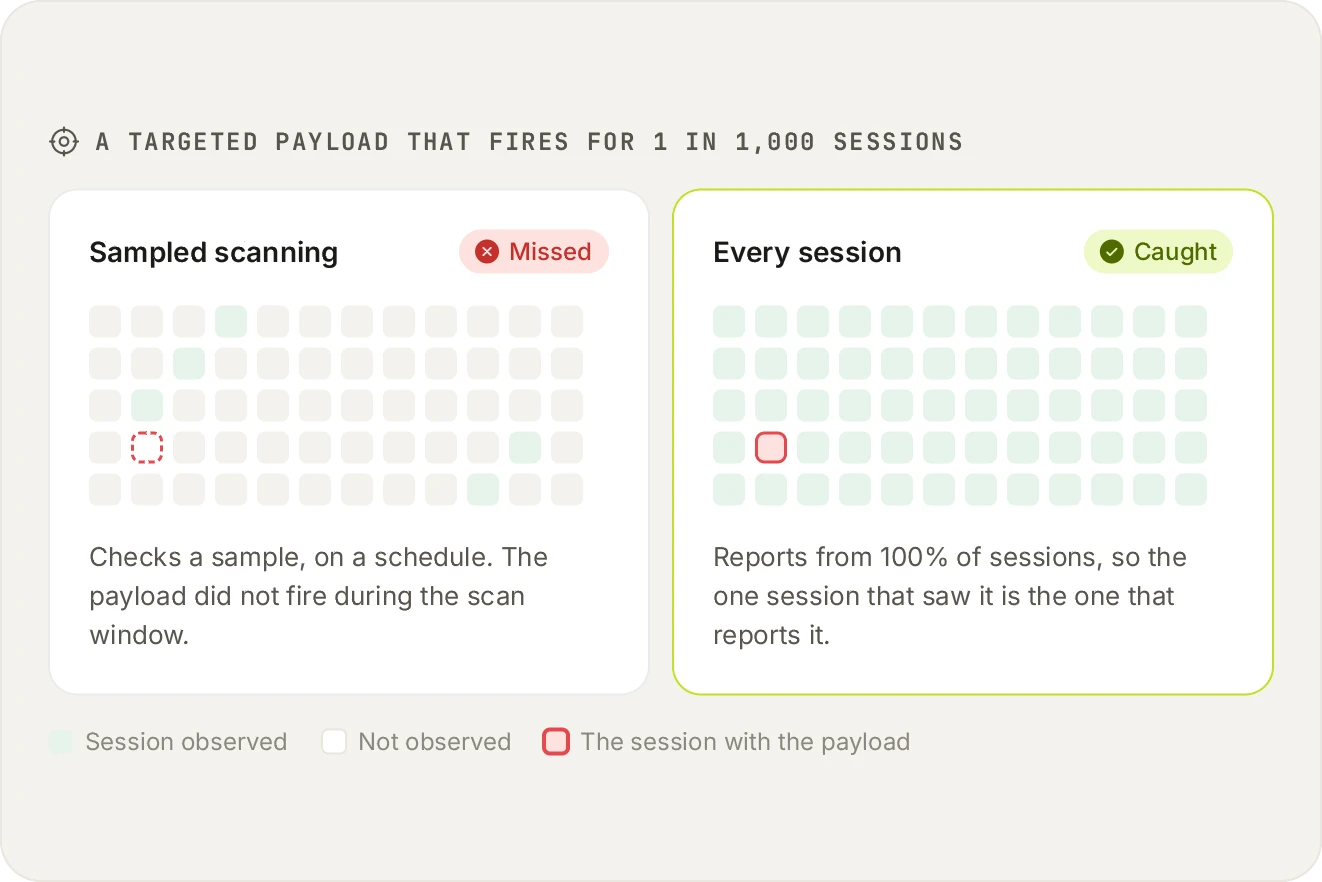
A targeted skimmer fires for a slice of traffic: one country, one card BIN, one hour. Sampling is the norm in this category, commonly 10% of sessions and sometimes as low as 1%. That is a coin flip against an attack designed to be rare.
How the script reads the form
Two common implementations. The first attaches event listeners to the existing payment inputs and reads values on keystroke, change or form submission. The second replaces the real form with a visually identical one the attacker controls, collects the data, then passes it through to the genuine form so the purchase still completes.
The second is harder to spot visually and easier to spot structurally, because the form on the page is no longer the form your application rendered.
How the data leaves
Method
What it looks like
Image request
A GET to an image URL with the card data encoded in the query string. Looks like an analytics pixel
Beacon on unload
A navigator.sendBeacon call fired as the page unloads, so it survives the navigation to the confirmation page
WebSocket
A persistent connection, which avoids repeated obvious requests
Fetch to a lookalike domain
A POST to a domain resembling a CDN or analytics provider
Split across requests
The payload broken into pieces so no single request contains anything card-shaped
Encoding is standard. Base64 and simple XOR are common, specifically so that a human glancing at network traffic sees nothing obviously wrong. This is why 'we would notice a request to a strange domain' is optimistic in practice.
The exfiltration happens in the browser, so detection has to as well.
It is not only card numbers
Once a script runs on the page it has the same access as your own code. Card fields are the best-known target, but the same position is used for more:
Session tokens. Values held in script-readable cookies, localStorage or sessionStorage can be copied and replayed. Depending on what the token carries, that can give an attacker a logged-in session without ever facing a multi-factor prompt.
Anything typed into a form. Login credentials, personal details and health information are read the same way card numbers are: from the field, from keystrokes, or through an iframe laid over the real form.
Wallet addresses. A script that rewrites a cryptocurrency address on the page sends the payment somewhere else, with no data stolen at all.
Cryptomining. Visitors' processors are put to work for as long as the page stays open.
Fake update prompts. A convincing browser or plugin update message that installs malware on the visitor's device.
Redirects and pop-ups. Visitors sent to scam or phishing pages from a site they trust.
Why the terminology varies
If you are comparing vendors and each uses a different word, they are almost certainly describing the same capability. Web skimming is the vendor term, e-skimming the regulatory one, digital skimming the analyst one. Magecart names the groups. Formjacking names the mechanism. None of them is a distinct attack.
What detects it
A script reading payment input fields when that is not its stated purpose
A new outbound destination from a previously well-behaved script
A changed payload hash on a script you approved
A payment form whose structure no longer matches what your application rendered
A script executing on the payment page that is not in your inventory at all
Sources and methodology
PCI DSS requirement text is quoted from PCI DSS v4.0.1 (June 2024), published by the PCI Security Standards Council, which is the current version at the time of writing. Requirements 6.4.3 and 11.6.1 became mandatory on 31 March 2025. Where we describe a competitor, we describe publicly available information and say so when something should be verified with the vendor. We publish this product and that is a bias worth knowing about while you read.
ASK AN AI
Don’t just take our word for it
Ask your assistant what to look for in a tool for PCI DSS 6.4.3 and 11.6.1.
Frequently asked questions
Yes in practice, with a technical distinction. Web skimming is the technique; Magecart refers to the groups who use it. A vendor offering Magecart protection and one offering web skimming protection are describing the same capability.
Yes, identical. E-skimming is the term regulators, card brands and law enforcement prefer, so it appears in PCI SSC and FBI advisories. Security vendors more often say web skimming.
A matter of emphasis. Formjacking names the mechanism, hijacking the form itself. Web skimming names the outcome, copying the card. Most formjacking is web skimming and the terms are used interchangeably.
No. The request goes from the customer's browser to the attacker's server and never traverses your network, so it does not appear in your logs at all.
Partly. Tokenisation protects the card after your provider receives it. A skimmer reads the value as the customer types, before tokenisation happens, so it does not prevent the theft.
Yes, by overlaying a fake form on the iframe, capturing keystrokes at the document level before the iframe receives them, or replacing the iframe's source. The parent page is the attack surface.
Deliberately and effectively: firing only on checkout URLs, only for certain card BIN ranges, only for a fraction of visitors, never for the same visitor twice, and never when the browser appears automated. Payloads are also usually obfuscated.
Typically everything useful on the page: name, billing address, email, phone and sometimes account credentials. Full identity sets are worth more than card numbers alone.
Sometimes, and it is weaker than it sounds. A scan from datacentre infrastructure with no session and no cart is exactly the visitor a targeted payload ignores, and between scans there is no coverage at all.
Build an inventory. You cannot detect an unexpected script without a definition of expected, which is also why PCI DSS 6.4.3 asks for one before anything else.
Related articles
Attacks
What is Magecart? Groups, methods and real incidents
Where the name came from, how the attacks work, and why they run for months undetected.
Attacks
What is formjacking? The mechanism, explained
How a script hijacks a form, the two main implementations, and what detects each one.
Attacks
Shadow code: the scripts nobody approved
Code executing on your pages that no one on your team chose, and how it gets there.
Attacks
Homoglyph attacks: when a domain is not the domain
Characters that render identically, and why they work so well against script allowlists.
See every script on your own checkout.
Install the tag, mark your payment pages, and watch the inventory fill in. Free forever on 1,000 page views a month, no credit card.
Free forever plan. No credit card.