Payment page security and page integrity
Scope decides everything else: your evidence, your controls and your bill. Here is what counts as a payment page, why an embedded iframe does not take the parent page out of scope, and what assuring page integrity actually involves.
Start for free
Talk to an expert
TL;DR
Payment page security
SCOPE IS WIDER THAN THE CHECKOUT URL
Any page where a cardholder enters, reviews or confirms card data, including confirmation screens, stored-card management, and any page embedding a payment iframe.
THE IFRAME DOES NOT REMOVE THE PARENT PAGE
Same-origin policy stops a script reading inside the iframe. It does not stop an overlay, a keystroke capture before the iframe sees it, or a swapped source.
INTEGRITY HAS THREE SURFACES
The scripts that execute, the HTTP headers, and the page content. They fail in different ways and are evidenced differently.
Short on time? Define scope with selector rules first. Everything downstream, including what you are billed for, follows from it.
ON THIS PAGE
What is payment page security?
Payment page security is the practice of ensuring that the checkout page a customer actually receives is the page you intended to serve, that every script executing on it is authorised and unaltered, and that any change to the page or its HTTP headers is detected and raised with a human. It is distinct from securing the payment itself. Encryption, tokenisation and a compliant provider protect the card once it has been submitted. Payment page security is concerned with the window before that, while the card sits in a form in a browser you do not control, on a page assembled from code written by several companies. PCI DSS v4.0.1 requirements 6.4.3 and 11.6.1 are the codification of that concern.
What counts as a payment page
This is the question that determines your scope, your evidence and your bill, and it is worth getting right before anything else. A payment page is any page where a cardholder enters, reviews or confirms card data. In practice that is wider than the single checkout URL most teams picture:
01
The checkout form
The obvious one, where the card number, expiry and CVV are entered. Also the step before it if that page can reach the form.
02
Confirmation and review screens
Where card details are displayed back for review, even partially. A masked PAN is still cardholder data on the page.
03
Stored card management
Add, edit or delete a saved card. Cardholder data is entered here too, and this is the page teams forget most often.
04
Any page embedding a payment iframe
The iframe belongs to your provider. The page around it is yours, and that is where a malicious script would sit.
The iframe misunderstanding
Embedding a provider's payment iframe reduces your scope. It does not remove the parent page from it. The browser's same-origin policy stops a script on your page from reading directly inside the iframe, and that is a real protection. It does not stop a script on your page from drawing a convincing fake form over the top of the iframe, capturing keystrokes before the iframe ever receives them, or swapping the iframe's source for a lookalike.
This is why the page hosting a payment iframe is in scope for 6.4.3 and 11.6.1, and why monitoring has to run on the parent page, above the iframe, to see anything meaningful.
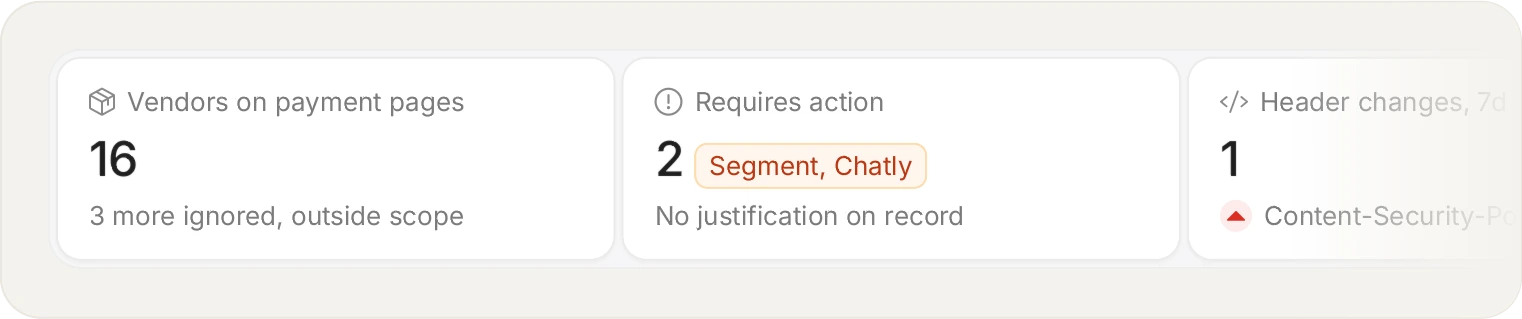
Requirement 6.4.3 is an authorisation record: every script on the payment page, where it came from, and why it is allowed to be there.
Page integrity, and what it means to assure it
Page integrity is the property that the page a customer received is the page you intended to serve. Assuring it means being able to detect when that stops being true, across three surfaces that fail differently:
01
The scripts that execute
New scripts, or approved scripts whose payload changed without approval. This is the 6.4.3 surface, and the one that moves most often.
02
The HTTP headers
A loosened Content-Security-Policy or a dropped X-Frame-Options changes what the browser permits, and is invisible in the page body. This is the 11.6.1 surface.
03
The page content itself
Injected markup, a replaced form, or an added field. Harder to baseline, because legitimate pages vary by test, locale and consent state.
Define your payment-page scope with selector rules, and keep the rest of your traffic out of your bill.
Start for free
See pricing
Building a secure payment page
In rough order of return on effort, and none of these are exotic:
01
Remove what you cannot justify
The fastest reduction in both risk and compliance work. Marketing tags and chat widgets accumulate on checkouts because nobody owns removing them.
02
Run a Content Security Policy
An origin allowlist is a real control. Understand that it governs where scripts load from, not what they do once allowed.
03
Pin integrity to the payload
So a compromised but approved vendor is a detectable change rather than silent inheritance.
04
Monitor from real sessions
The page a datacentre crawler receives is not the page your customer receives, and targeted payloads are written for that difference.
05
Alert a named human
11.6.1 asks you to alert personnel. A log nobody is subscribed to does not meet it, and the alert record is what an assessor asks for.
06
Keep the evidence
Assessments look backwards. Retention shorter than your assessment cycle means regenerating history you no longer hold.
Frequently asked questions
Read the FAQ
This is the question worth asking before you choose anything. Compliance is assessed as of the time of the breach, not the time of your last questionnaire. A forensic investigation that finds the client-side control was inadequate affects your liability position, the fines passed through your acquirer, and in many cases whether your cyber-insurance responds at all. Being able to show what was monitored, and when, is the difference between an argument and a record.
This is the right question to ask of any client-side security product, and the answer is that our own tag is integrity-checked when it loads. If what arrives in the browser is not the script we published, it does not run. This matters more than it first sounds: a monitor an attacker can silently modify is worse than no monitor at all, because it reports all-clear while the page is compromised. It is worth asking every vendor you evaluate whether their agent verifies itself on load, because not all of them do.
Yes. The iframe belongs to your provider and reduces your scope meaningfully, but the page hosting it is yours. A script on that page can overlay a fake form, capture keystrokes before the iframe receives them, or change the iframe's source. Monitoring has to run on the parent page to see any of that.
No, though it reduces the value of what can be stolen after submission. Tokenisation protects the card once your provider holds it. It does nothing about the moment the customer is typing into a form, which is precisely when a skimmer reads it.
In short: the property that the page received matches the page intended. Assuring it means detecting change across the scripts that execute, the HTTP headers the browser received, and the page content itself. The three surfaces fail differently and are evidenced separately.
With selector rules. You define the URL patterns that constitute your payment scope, and that named scope becomes what both requirements are measured against. It also keeps the rest of your site out of the page-view count, so scope and cost move together.
Sometimes, and it is a separate decision. PCI only requires it on payment pages. Teams often extend monitoring to login and account pages, because the same class of script can harvest credentials or personal data, and because GDPR and HIPAA exposure does not stop at the checkout.
This works, and it needs care in configuration. In an SPA the payment step may not be a distinct document load, so scope is defined by the route and the presence of the payment form rather than by a server-rendered URL. Worth confirming during setup so your scope and your evidence line up.
Start with the scripts already on your checkout.
Install the tag, mark your payment pages, and see the inventory fill in. Free forever on 1,000 page views a month, no credit card.
Free forever plan. No credit card.