PCI compliance software for the client-side requirements
There are two kinds of PCI compliance software, and they are not substitutes. This one is the technical control for requirements 6.4.3 and 11.6.1, not a full-scope GRC platform. Here is the difference.
Start for free
Talk to an expert
TL;DR
PCI compliance software
TWO CATEGORIES, ONE LABEL
Full-scope platforms track evidence across all 12 requirement families. Client-side tools are the actual technical control for 6.4.3 and 11.6.1. Most teams need both.
WHAT THIS IS
The client-side control. Script inventory, integrity, header and page change detection, blocking, and a weekly evidence pack.
WHAT THIS IS NOT
A GRC platform. It does nothing about segmentation, encryption, access control or the other ten requirement families, and we would rather say so now.
Short on time? If you already have a GRC platform and an open finding on 6.4.3 or 11.6.1, this is the piece that closes it.
ON THIS PAGE
What is PCI compliance software?
PCI compliance software is any tool that helps an organisation meet or evidence the PCI Data Security Standard, and the term covers two quite different categories: full-scope platforms that track evidence across all twelve requirement families, and client-side tools that implement the specific technical controls required on payment pages by requirements 6.4.3 and 11.6.1. The distinction matters because they do not replace each other. A GRC platform gives you somewhere to record that a client-side control exists, but it cannot see the scripts running in your customer's browser. A client-side tool produces that control and its evidence, but has nothing to say about network segmentation or key management. This product is the second kind.
Two kinds of PCI DSS compliance software, and which one you need
Search for PCI compliance software and you get two different product categories with the same label. Buying the wrong one is the expensive mistake, because they do not substitute for each other.
Full-scope compliance platforms
Client-side script tools
What they do
Track evidence across all 12 PCI requirement families, manage policies, run questionnaires, collect screenshots, coordinate the audit
Inventory and monitor the scripts executing on payment pages, detect page and header changes
Requirements covered
All of them, at the level of workflow and evidence collection
6.4.3 and 11.6.1, at the level of the actual technical control
Typical buyer
Compliance lead, GRC team
Security engineer, ecommerce or platform team
What they cannot do
Produce the client-side technical control itself. They give you a place to record that you have one
Anything about network segmentation, encryption at rest, access control or the other ten requirement families
Most organisations past a certain size end up with both, and they complement each other cleanly: the platform records that the control exists, and the client-side tool is the control. If someone is selling you one as a replacement for the other, that is worth a second question.
What this tool covers, and what it does not
Being direct about scope, because it saves everyone a call. This product automates the two client-side requirements introduced in PCI DSS v4.0 and mandatory since 31 March 2025. It does not touch the other ten requirement families, and it is not a GRC platform.
01
Covered: 6.4.3
Script inventory with a written justification per script, authorisation workflow, and integrity assurance pinned to the payload hash. Requirement 6.4.3
02
Covered: 11.6.1
Change- and tamper-detection on payment page content and HTTP headers, with alerting to a named human and a weekly record. Requirement 11.6.1
03
Not covered
Network segmentation, encryption, access control, logging, vulnerability management, policy documentation, and the rest of the standard. A full-scope platform or your QSA handles those.
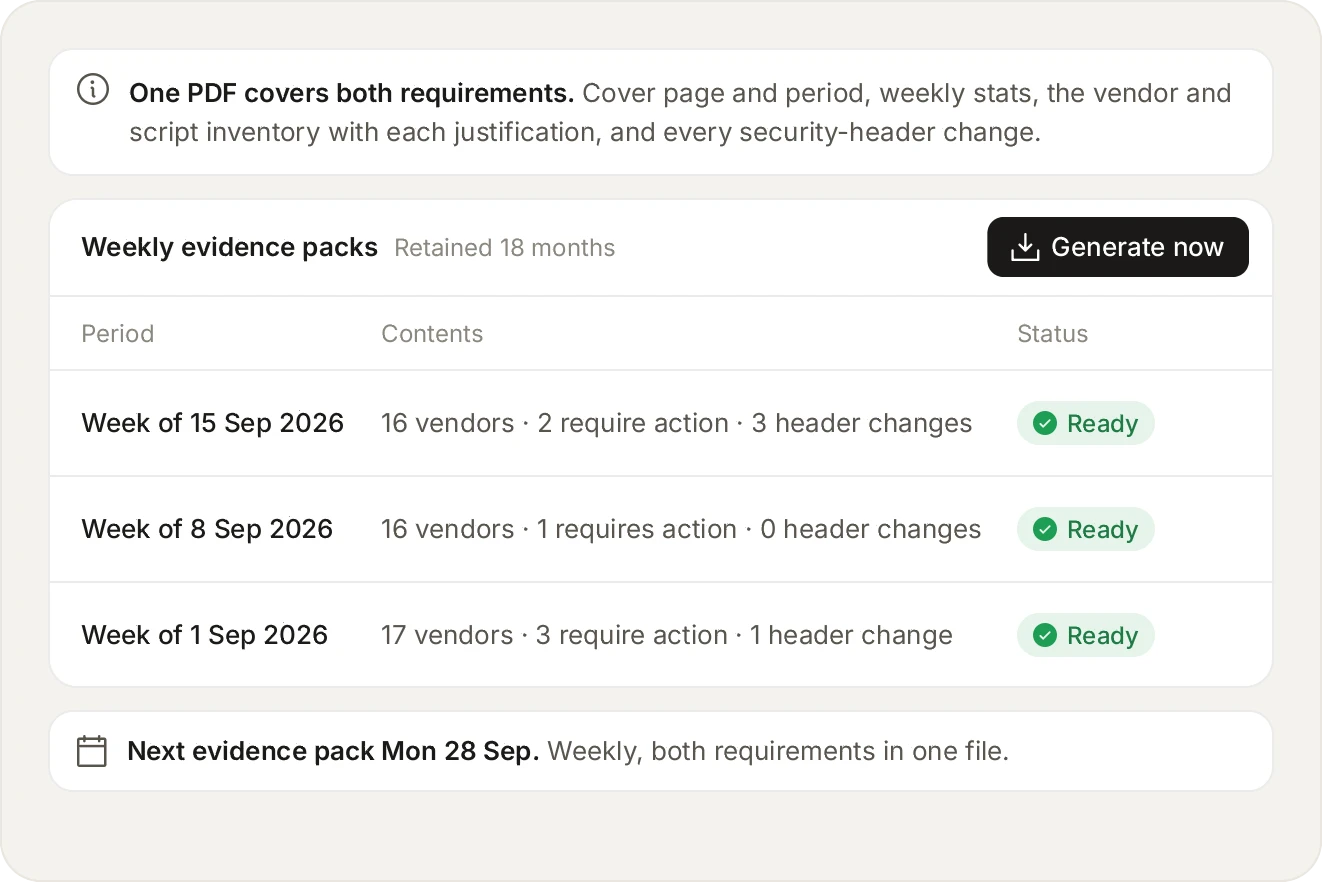
The four things an assessor asks to see, generated weekly and kept for 18 months, which is longer than the raw data behind them.
Choosing between PCI compliance tools for the client-side requirements
Once you have narrowed to the client-side category, the questions that actually separate the tools are narrow and technical. These are the ones worth asking on a demo:
01
Does it see real sessions or a crawl?
A scanner requests your page from a datacentre with no session and no cart. That is not the page a customer gets, and a targeted skimmer is written for exactly that difference.
02
Can it block, or only report?
Some assessors do not accept a control that can only observe. Ask whether it can stop a script, and at what granularity it does so.
03
Does it keep 6.4.3 and 11.6.1 apart?
They are two records assessed separately. A single merged PCI report is a common reason evidence is returned.
04
What is metered, and what is unlimited?
Per-script or per-domain pricing punishes you for having an accurate inventory, which is the opposite of the behaviour you want.
05
How long is evidence retained?
Assessments look backwards. Retention shorter than your assessment cycle means regenerating history you no longer hold.
06
What does the assessor actually receive?
Ask to see a real evidence pack rather than a dashboard screenshot. The pack is the artefact that gets handed over, not the interface.
Both client-side requirements, on the free plan, with no credit card.
Start for free
See pricing
How this is priced
Page views are the only metered unit. A page view is counted when our monitoring script is loaded on a page within the scope you configured and starts sending telemetry data, and a request we blocked is never counted. Scripts, domains, vendors, alerts, blocks, teams and users are unlimited on every plan, including the free one.
Free covers 1,000 page views a month. Pro starts at $99/month for 100,000 payment-page views and scales to $499/month at 500,000 and $799/month at 1,000,000, with overage at $0.0013 per page view. Paying annually costs 10 months instead of 12. Enterprise is custom and adds a 99.9% uptime SLA, 90-day script history, SSO and an organisation layer. Full detail is on the pricing page.
Frequently asked questions
Read the FAQ
This comes up in almost every assessment conversation. Assessors want evidence covering the period being assessed, not a screenshot taken the week you bought the tool. Evidence packs generate weekly from the moment the tag is installed and are retained for 18 months, so the record builds itself from day one rather than being reconstructed under pressure later.
Yes, you can still deploy, and be straight with your assessor about the date. A control that is demonstrably live, with a documented start date and a remediation plan for the period before it, is a much shorter conversation than an open finding with neither. The inventory populates from live traffic within days, so there is something real to show quickly.
Yes, it analyses behaviour, and the distinction is worth pressing every vendor on. Checking a script URL against a list of known-bad domains is cheap, and it only ever catches what is already known. What matters is what the script does: which fields it reads, where it sends data, and whether its payload changed since you approved it.
No, and we would rather be direct about it. This automates the two client-side requirements, 6.4.3 and 11.6.1, which were introduced in PCI DSS v4.0 and became mandatory on 31 March 2025. The other ten requirement families are outside what a script-monitoring tool can observe. Most customers run this alongside a GRC platform or their QSA's process.
No. Software produces controls and evidence, and compliance is a judgement made by your assessor or by you on a self-assessment questionnaire, across the whole standard. Any vendor promising compliance itself from a single tool is overselling, and an assessor will not accept the claim either.
Often yes, and this surprises people. If the payment form is in an iframe served by your provider, the iframe is theirs, but the page hosting it is yours. A script on your page can reach around an iframe in several well-documented ways, and the page around the iframe is in scope. See hosted payment pages and PCI.
They are real options and worth evaluating, especially if you already pay for the platform. Akamai, Cloudflare, Imperva and F5 all ship a client-side module. Three differences are worth checking before you settle. Price: those modules are priced as an add-on to an enterprise platform, and Script Monitoring starts free and publishes every tier up to $799 a month. Focus: client-side security is the whole product here, not one module inside a CDN or WAF suite, so 6.4.3 and 11.6.1 evidence is the thing the roadmap is pointed at. Sampling: we monitor every page view rather than a sample of sessions, and a skimmer that fires on one request in 300 is missed by anything that samples. Ask any vendor what percentage of sessions they actually observe. Our comparison pages go through each one with a genuine strength and a genuine limitation.
Published: free for 1,000 page views a month, Pro from $99/month for 100,000 payment-page views, $499/month at 500,000 and $799/month at 1,000,000, with overage at $0.0013 per page view and annual billing at 10 months instead of 12. Enterprise is custom. Page views are the only metered unit, and scripts, domains, alerts and users are unlimited on every plan.
Yes, the controls are QSA-validated and the evidence pack is built around the four things assessors ask for: the scope, the inventory with justifications, the header change record, and the alerts raised. Assessors do differ on format, so if yours wants something specific it is worth raising with us early rather than the week before your assessment.
Start with the scripts already on your checkout.
Install the tag, mark your payment pages, and see the inventory fill in. Free forever on 1,000 page views a month, no credit card.
Free forever plan. No credit card.