PCI DSS 4.0.1
PCI DSS requirement 6.4.3, in plain terms
Inventory every script on your payment pages, justify each one in writing, and prove none of them changed without approval. Here is what 6.4.3 asks for, and what an assessor looks for.
Start for free
Talk to an expert
TL;DR
PCI DSS 6.4.3
WHAT IT REQUIRES
A method to confirm each payment-page script is authorized, a method to assure each script's integrity, and an inventory with a written business justification per script.
SINCE WHEN
Mandatory since 31 March 2025. It was a future-dated best practice in PCI DSS v4.0.
THE USUAL FAILURE
The inventory lists the tags you added, not the scripts your vendors loaded. 6.4.3 applies to every script that executes, whoever put it there.
Short on time? The fastest way to a correct inventory is to start from what actually executed in real sessions, then approve or remove each entry.
ON THIS PAGE
What is PCI DSS requirement 6.4.3?
PCI DSS 6.4.3 requires you to manage every script that loads and executes in the consumer's browser on a payment page, by confirming each script is authorized, assuring the integrity of each script, and maintaining an inventory with a written justification of why each one is necessary. It was introduced in PCI DSS v4.0 as a future-dated requirement and became mandatory on 31 March 2025 under v4.0.1. It exists because card-skimming attacks such as Magecart do not compromise your server: they add or alter a script that runs in your customer's browser, reads the card fields, and sends the contents elsewhere. An inventory you can trust is the control that makes an unapproved script visible.
What requirement 6.4.3 actually says
PCI DSS v4.0.1 requirement 6.4.3 applies to all payment page scripts that are loaded and executed in the consumer's browser. It asks for three things, and an assessor will look for all three separately:
01
A method to confirm each script is authorized
Someone with authority has approved this script for this page. In practice that means a review step and a record of who approved what, not a note in a spreadsheet nobody has opened since the last assessment.
02
A method to assure the integrity of each script
You can show the script has not been altered since you approved it. Pinning the payload hash is the cleanest way to do this, because it detects a change in content even when the URL is unchanged.
03
An inventory with written justification
A list of every script, with a written business reason for why each one is necessary. The justification is per script, not per vendor, which is where most inventories fall short.
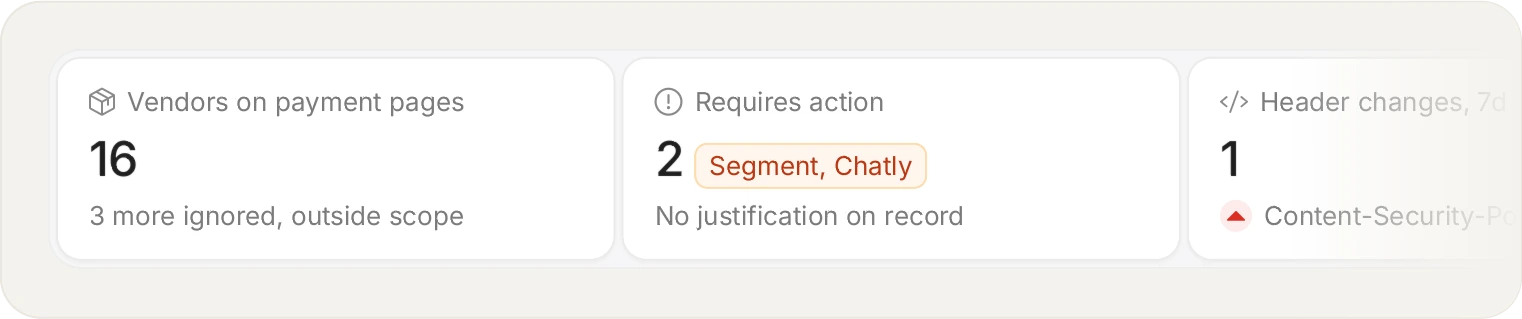
Requirement 6.4.3 is an authorisation record: every script on the payment page, where it came from, and why it is allowed to be there.
Building the payment-page script inventory
The hard part is not writing the list. It is knowing what to put on it. Most teams start from the tags they remember adding, and the inventory is wrong on day one, because a tag manager loads vendors, and those vendors load their own. A script you never chose is still a script that executed on your payment page, and 6.4.3 does not distinguish between the two.
Starting from what actually executed inverts the problem. The tag reports every script that ran in a real session, so the inventory begins as a complete list of observed reality, and your job becomes approving, justifying or removing each entry rather than trying to remember what is there.
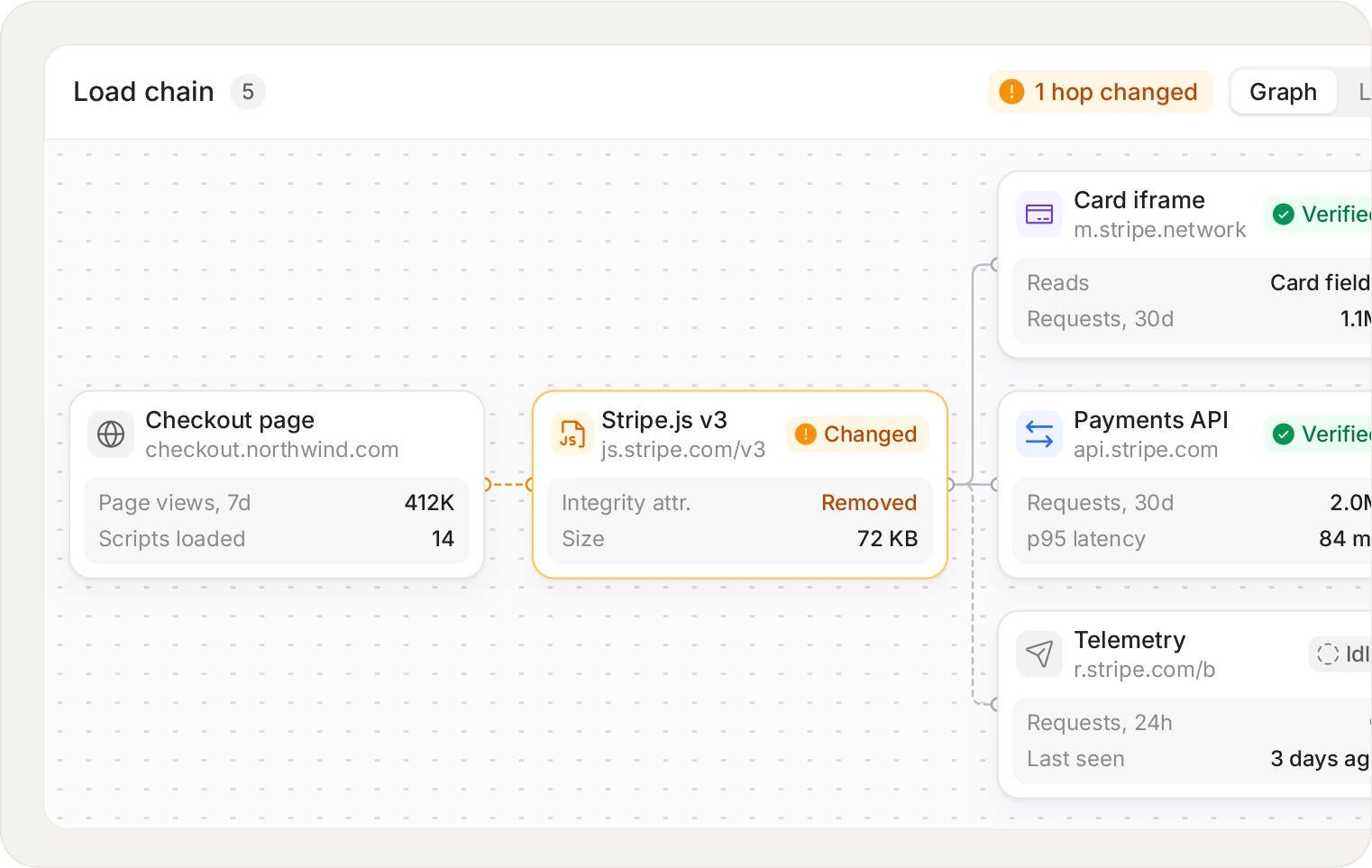
You approve a vendor, the vendor loads its own vendors. 6.4.3 applies to every script that executes, not only the ones you added yourself.
Script integrity, and why the URL is not enough
A vendor can change the contents of a file without changing its address. If your integrity check is "the script is still loading from the domain we approved", you will not notice. Subresource Integrity solves this for static files by pinning a hash in the markup, but it breaks the moment a vendor legitimately updates their script, which is why few teams run SRI on third-party tags in production.
Pinning approval to the payload hash gets the same guarantee without the breakage. When a vendor ships new code, the script does not silently continue: it returns to the inventory as a change that needs review. You decide whether to approve the new version. That is the difference between an inventory that reflects reality and one that reflects the day it was written.
See what is already running on your checkout. The free plan covers 1,000 page views a month.
Start for free
See pricing
Writing a business justification that holds up
A justification answers why this script needs to be on this page, not why the vendor is useful in general. Assessors notice the difference, and the second version is also the one that makes it obvious when a script should be removed.
NOT A JUSTIFICATION
"Analytics"
HOLDS UP
"Measures checkout completion rate, required by the growth team, reviewed quarterly"
Three questions make most justifications write themselves: what does this script do on the payment page, who owns the decision to keep it, and what breaks if it is removed. If the third answer is "nothing", you have found something to cut, which is the cheapest compliance work available.
Who has to comply with PCI 6.4.3
You will see this requirement written both as PCI 6.4.3 and as PCI DSS 6.4.3. They are the same thing, and the short form is what most people search for. It has been mandatory since 31 March 2025, when it stopped being a future-dated best practice in PCI DSS v4.0. It applies to entities with payment pages where scripts execute in the consumer browser. SAQ A merchants received a carve-out in the January 2025 update, but it is narrower than most people assume: you have to confirm your site is not susceptible to attacks from scripts that could affect your ecommerce systems, which is a statement you should be able to support. If you embed a payment iframe, the iframe belongs to your provider but the page around it is yours, and that page is where a script can reach the form.
Frequently asked questions
Read the FAQ
Yes, and this is often missed. 6.4.3 covers every script that loads and executes on the payment page, which includes your own bundle and anything a build-time dependency pulled into it. A backdoored npm package ends up in your first-party code and runs with full page access, so treating first-party as automatically trusted leaves a real gap.
The full chain rather than the first link. A tag manager loads a vendor, that vendor loads a CDN helper, and that helper loads a pixel from a company you have never heard of. Each load is recorded with the call stack that triggered it, so the inventory shows the depth rather than stopping at the scripts you added yourself.
Yes, and this is the most common gap. The requirement covers all scripts loaded and executed in the consumer's browser on a payment page. If your tag manager loads a vendor and that vendor loads two more, all of them executed on your payment page and all of them belong in the inventory. Starting the inventory from observed sessions rather than from memory is the only reliable way to catch them.
Yes in principle, and rarely in practice. Nothing in the standard requires a tool. The difficulty is that a spreadsheet records what you believed on the day you wrote it, while 6.4.3 also asks you to assure integrity, which means detecting change. A static list cannot tell you a vendor shipped new code last Tuesday, so most teams end up needing something that watches.
Hashing counts, and it is the most practical method. You record the payload you approved and detect when what loads no longer matches it. Subresource Integrity achieves this in markup, but it breaks when a vendor legitimately updates, which is why it is rarely used on third-party tags. Pinning approval to the observed payload hash gives the same assurance and turns a vendor update into a review item.
Partly, and the carve-out is narrower than it sounds. The January 2025 update exempted SAQ A merchants from certain requirements, but it asks them to confirm their site is not susceptible to attacks from scripts that could affect their ecommerce systems. If you embed a payment iframe, the page around the iframe is still yours and is still where a malicious script would sit. PCI SSC FAQ 1588 sets out two ways to make that confirmation: apply 6.4.3 and 11.6.1 techniques to the page, or get written confirmation from your PCI DSS compliant payment provider that its solution protects your page from script attacks.
This is usually quick: most teams have a complete picture within a few days. The tag starts reporting scripts immediately, and the work is reviewing the list rather than building it. The slower part is chasing internal owners for justifications, which is a people problem rather than a technical one.
No, and it is worth being precise. 6.4.3 is about authorisation, integrity and inventory. It does not mandate blocking. Blocking is how you act on what the inventory tells you, and some assessors view a control that can only observe as weaker than one that can also stop a script, which is worth confirming with your own assessor early.
No, not for their 3DS function. The PCI Security Standards Council says scripts loaded for 3-D Secure, through the iframe your 3DS server provides, do not need validating under 6.4.3, because of the trust relationship you already have with your 3DS provider. Any script that runs for another purpose on the same page is still in scope.
Start with the scripts already on your checkout.
Install the tag, mark your payment pages, and see the inventory fill in. Free forever on 1,000 page views a month, no credit card.
Free forever plan. No credit card.