Third-party script monitoring, including the scripts you never added
You approved a vendor. The vendor loaded two more. All three executed on your page, and the browser treats them identically. Here is what monitoring third-party scripts actually involves.
Start for free
Talk to an expert
TL;DR
Third-party script monitoring
THE SET IS A TREE, NOT A LIST
Vendors load vendors. The last script in a chain is often a company you have never heard of, and it executed with the same privileges as your own code.
FOUR THINGS TO MONITOR
Identity and load chain, payload integrity, runtime behaviour, and change over time. Most tools cover the first and stop.
MAKE IT A WEEKLY QUEUE
A review that surfaces only what changed takes ten minutes. An annual report of everything takes a week and gets skipped.
Short on time? Approving a vendor is not the same as approving a script, and 6.4.3 applies to the script.
ON THIS PAGE
What is third-party script monitoring?
Third-party script monitoring is the practice of recording every externally sourced script that executes on your pages, verifying that each one is authorised and unchanged, observing what it does at runtime, and alerting when any of that changes. It exists because a modern page runs code from companies you have a contract with, companies you do not, and companies you have never heard of, all with the same privileges as your own JavaScript. A script from an analytics vendor can read your payment form just as easily as your checkout code can. On payment pages this stopped being optional in March 2025, when PCI DSS requirement 6.4.3 became mandatory.
First party, third party, and the ones nobody counted
Teams usually know their third parties. The gap is what those third parties load. A tag manager is a mechanism for loading other people's code, and the vendors it loads frequently load their own, so the set of code executing on your page is a tree rather than a list.
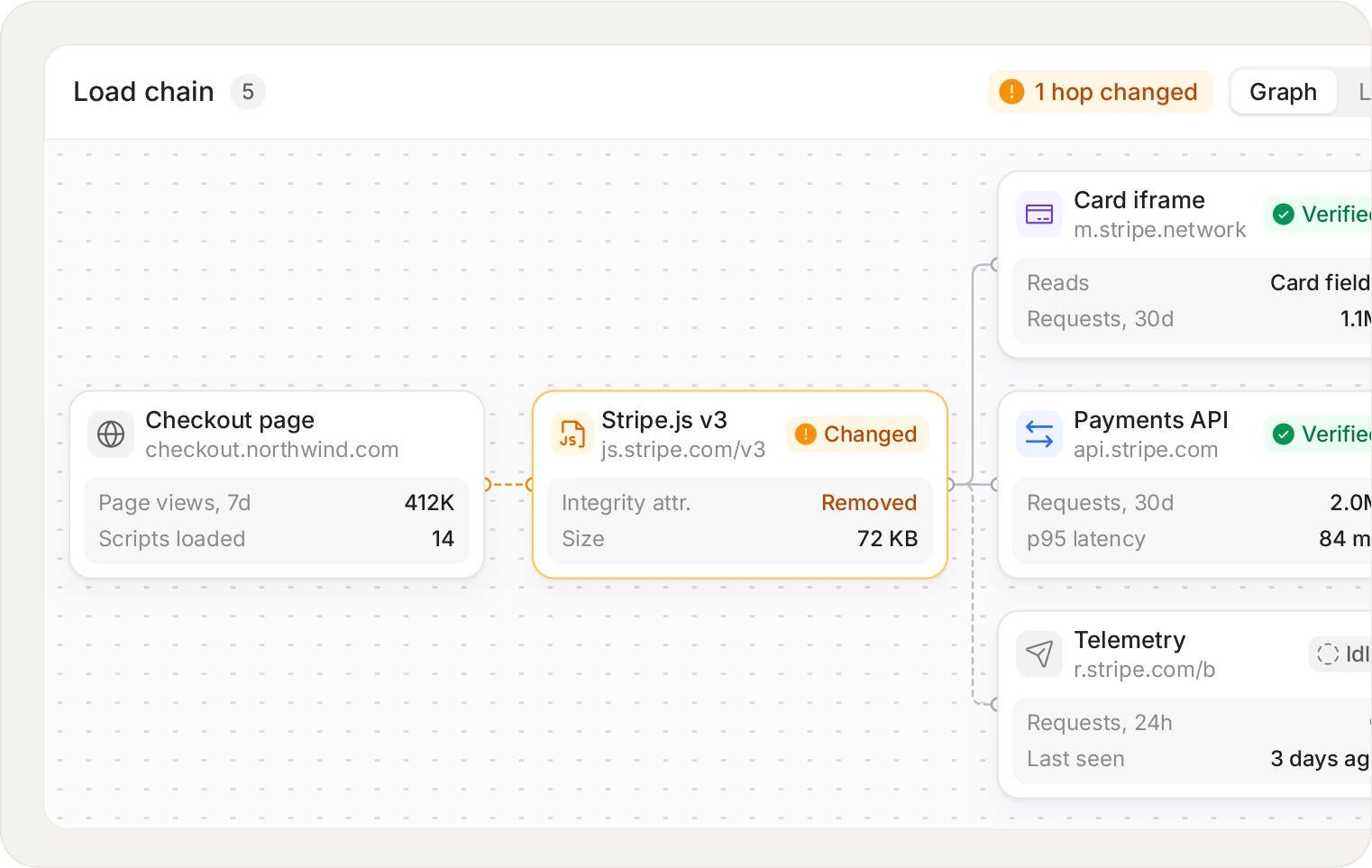
You approve a vendor, the vendor loads its own vendors. 6.4.3 applies to every script that executes, not only the ones you added yourself.
The practical consequence: approving a vendor is not the same as approving a script. You approved a relationship with a company. What executed was a chain, and the last link is often somebody you have never heard of. PCI DSS 6.4.3 makes no distinction between the script you added and the script your vendor's vendor added, because the browser makes no distinction either.
What monitoring a third-party script actually means
01
Identity
Where it loaded from, what loaded it, and when it first appeared. The load chain is the part that answers why a script you never approved is on the page.
02
Integrity
Whether the payload matches what you approved. A vendor can change file contents without changing the URL, and an origin allowlist will not notice.
03
Behaviour
What the script does once running: which DOM elements it touches, whether it reads form fields, and where it sends data.
04
Change over time
When any of the above moved. A script that was well-behaved for six months and changed last Tuesday is the interesting case.
Turning monitoring into a vendor review that happens
Most vendor reviews fail for organisational reasons rather than technical ones: the list is out of date, nobody owns it, and the review happens once a year under assessment pressure. Monitoring helps only if it produces a small, regular queue rather than a large annual report.
The useful shape is a weekly prompt containing only what changed: new scripts, new destinations, and approved scripts whose payload moved. Everything stable stays quiet. A vendor review that takes ten minutes a week is a vendor review that actually happens.
Unlimited scripts, vendors and domains on every plan. You are only metered on page views.
Start for free
See pricing
Beyond PCI: consent, privacy and data leakage
The same visibility answers questions from outside the security team. Which scripts are setting cookies before consent. Which are sending personal data to a destination that is not in your privacy notice. Whether a tag that was supposed to be removed after a campaign is actually gone. These are GDPR, CCPA and HIPAA questions, and they are answered from the same inventory.
Frequently asked questions
Read the FAQ
Yes, and it is consistently the noisiest thing we see. The trap is that a container looks trustworthy because of who publishes it: you see Google Tag Manager and assume it is fine. An attacker does not need your container, they inject through a different container loaded as a sub-request, so the origin still reads as Google. What matters is the behaviour of what the container loaded, not the name on it.
Meaningfully different. A tag manager shows the tags configured in it. It does not show what those tags loaded afterwards, and it does not show anything added outside the container, which includes anything an attacker injected. The container is a list of intentions, not a record of what ran.
Sometimes. PCI only requires it on payment pages. Many teams extend it to login and account pages because the same class of script can harvest credentials or personal data, and because consent and privacy obligations apply site-wide.
Useful terms: a third party is a vendor whose script you added. A fourth party is a script that your vendor's script loaded. Nth party is the general case of a chain of arbitrary depth. They matter because you have no contract with them, often no visibility, and full exposure.
Yes, marginally, like any tag, and it is designed not to be felt. The tag is small, loads asynchronously and is fail-open, so if our service is unavailable your page still renders. The heavy analysis of each script happens off the page rather than in your visitor's browser.
Yes. Monitor-only mode produces the same evidence, including a record of what would have been blocked and on which pages, with nothing stopped. Most teams run this way for a few weeks while the inventory settles.
More than the team expects, and the number itself is less useful than the chain. The consistent finding when teams first look is not the count but the depth: scripts two and three links away from anything anyone approved. We would rather you measure your own than quote an industry average at you.
No, you choose the pages. Scope is defined by URL pattern, and only pages matching those patterns are monitored and counted. For PCI work that is usually the payment pages on their own. For broader third-party risk, teams widen it to whichever pages carry the most vendor tags.
Start with the scripts already on your checkout.
Install the tag, mark your payment pages, and see the inventory fill in. Free forever on 1,000 page views a month, no credit card.
Free forever plan. No credit card.