Magecart protection that sees the skimmer in the session
A Magecart skimmer reads the card in your customer's browser and sends it straight to the attacker. Nothing reaches your server, so nothing in your server-side stack can see it. Detection has to happen where the code runs.
Start for free
Talk to an expert
TL;DR
Magecart protection
THE ATTACK
Attacker JavaScript on your checkout reads the card fields and posts the contents to a server they control, directly from the visitor's browser.
WHY IT HIDES
The exfiltration never touches your infrastructure. Your WAF sees nothing, your logs show a successful checkout, and the customer receives their order.
WHAT STOPS IT
An inventory of what is supposed to be there, integrity pinned to the payload rather than the URL, and behavioural alerting on scripts that start doing something new.
Short on time? Most skimmers arrive through a compromised vendor you already approved, which is why an origin allowlist alone does not help. CSP vs script monitoring.
ON THIS PAGE
What is Magecart?
Magecart is the umbrella name for a set of cybercriminal groups that inject malicious JavaScript into ecommerce checkout pages to steal payment card data as customers type it, a technique also called web skimming, e-skimming or formjacking. The name comes from early campaigns targeting Magento stores, and it is now used loosely for the whole category rather than one group. The defining characteristic is where the theft happens: in the customer's browser, on a page that otherwise works perfectly. Because the stolen data is posted from the browser directly to the attacker, the transaction completes normally and neither your server logs nor your network controls record anything unusual.
How a Magecart attack actually works
The attacker does not need your server. They need one script on your checkout, and there are three common ways to get one:
01
Compromise a vendor
Breach a third party whose script you already load and change what it does. Your allowlist passes, your CSP passes, and the origin is one you approved.
02
Compromise your tag manager
A tag container injects arbitrary JavaScript by design. An attacker with access needs no codebase access, no deploy and no code review.
03
Exploit your own site
A vulnerable plugin, an outdated platform or an exposed admin account, used to add a script to the page directly. The classic Magento route.
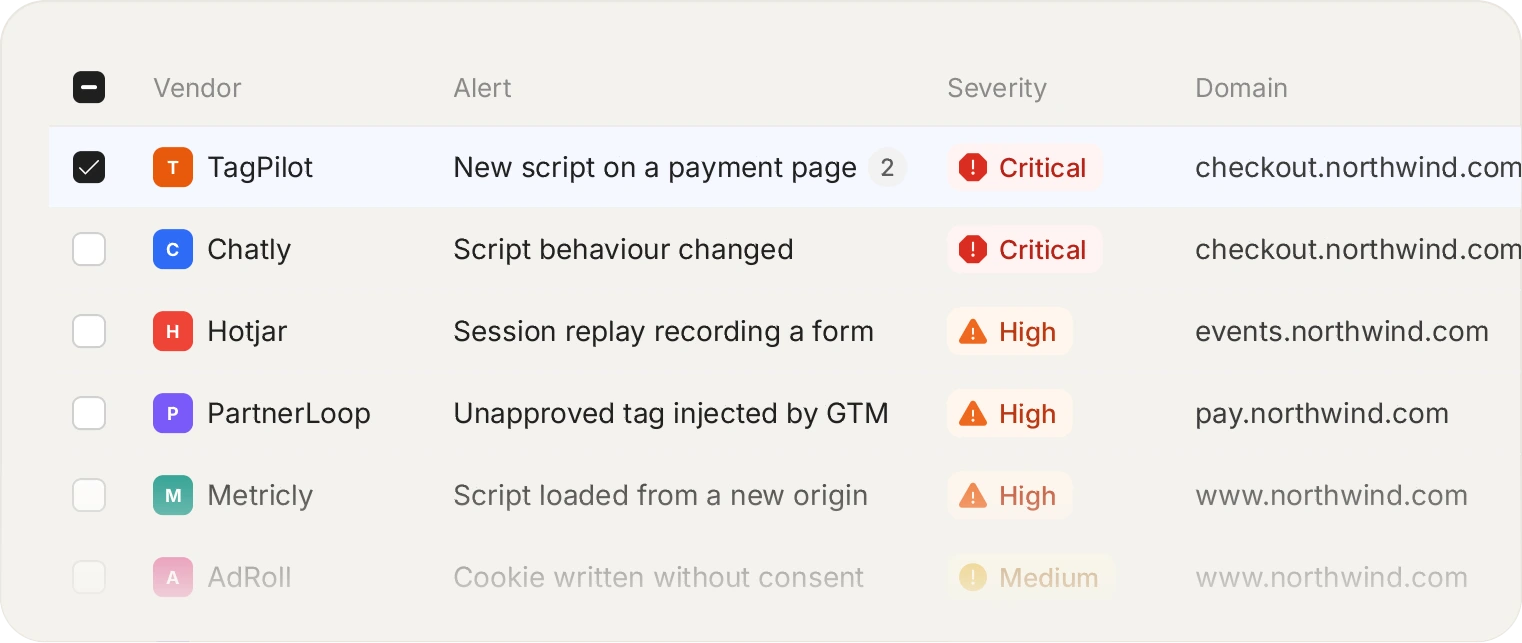
The exfiltration never touches your server, so a WAF never sees it. The request happens in the visitor's browser, which is the only place it can be observed.
Why it is invisible to the rest of your stack
The skimmer reads the card field in the browser and posts it from the browser to a server the attacker controls. That request never traverses your infrastructure. Your WAF has nothing to inspect. Your server logs record a normal, successful checkout, because the checkout genuinely succeeded: the customer paid, the order shipped, and the card was copied on the way through.
This is why the average dwell time for these attacks is measured in weeks or months rather than hours. Nothing breaks. There is no outage, no error rate, no failed payment. The first signal is usually a common point of purchase report from an acquirer, which arrives long after the damage.
Magecart mitigation that works in practice
Three controls, in the order they earn their place:
01
Know what is on the page
You cannot detect an unexpected script without a definition of expected. The inventory is the control that makes everything downstream possible, which is also why 6.4.3 exists.
02
Pin the payload, not the URL
A compromised vendor serves malicious code from an approved address. Integrity by payload hash catches this; an origin allowlist does not.
03
Watch behaviour, not just identity
A script that suddenly starts reading form fields or posting to a new destination is worth an alert even if it is a script you approved last quarter.
See every script on your checkout, including the ones your vendors loaded.
Start for free
See pricing
The part that defeats periodic scanning
Skimmers are written to be rare. Common triggers: only on the checkout URL, only when the page contains a card field, only for a card BIN range worth stealing, only outside the attacker's working hours, and never when the browser looks automated. A crawler arriving from a datacentre IP with no session and no cart is exactly the visitor the payload is written to ignore.
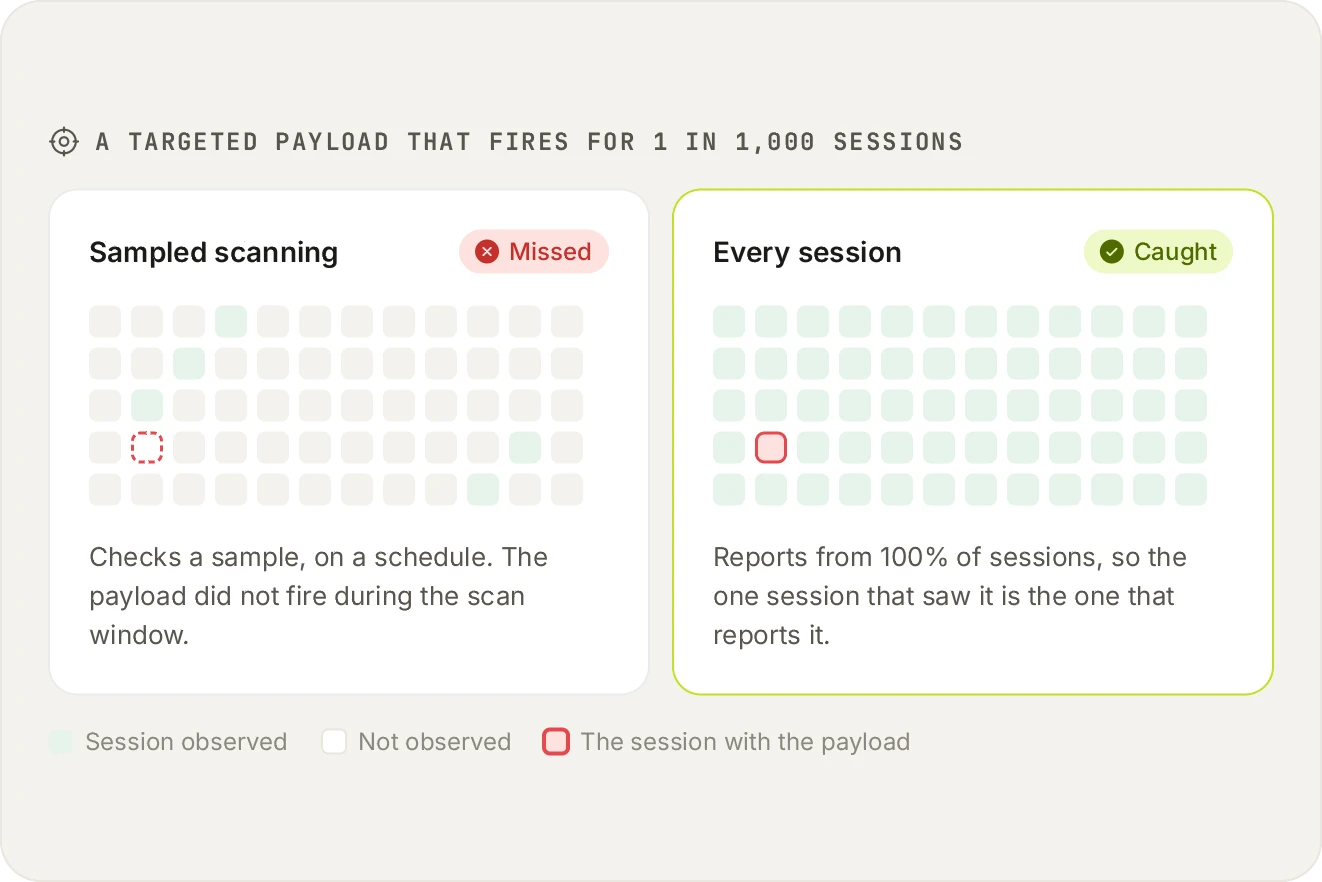
A targeted skimmer fires for a slice of traffic: one country, one card BIN, one hour. Sampling is the norm in this category, commonly 10% of sessions and sometimes as low as 1%. That is a coin flip against an attack designed to be rare.
Reporting from every real session inverts that. The one visitor who triggered the payload is the one whose session reports it, which is the only reliable way to catch something engineered to be uncommon.
Frequently asked questions
Read the FAQ
No, and this is the single most important thing to understand about this attack class. A web application firewall inspects traffic arriving at your application. A skimmer reads the card in the browser and posts it from the browser to the attacker's server, so that traffic never reaches your infrastructure and there is nothing for the WAF to examine.
Partly, and it is worth running one. A CSP restricts which origins may load scripts and where they may send data, so it raises the cost of the attack. It does not help when the malicious code arrives from an origin you already allowed, which is what happens when a vendor you trust is compromised. That is the most common Magecart route, so CSP alone leaves the main path open.
Typically far too long: weeks to months is common, because nothing visibly breaks. Payments succeed, orders ship, and error rates do not move. Many merchants first learn about it from an acquirer or card brand raising a common point of purchase, by which point the exposure window is already large.
Yes. Blocking works at four granularities: by domain, by URL, by payload hash, or by a single capability such as reading form fields. The last one is useful when you need a vendor's script to keep working but want to remove its ability to touch the payment form.
That is the normal case, and it is the reason periodic scanning struggles. Payloads commonly check the URL, the presence of a card field, the card BIN range, the time of day, and whether the browser looks automated. Reporting from 100% of real sessions means the visitor who triggered it is the one who reports it.
Yes, still active. The tooling and the hosting have changed, and the underlying economics have not: checkout pages load third-party code, third parties get compromised, and card data is valuable. The two new PCI DSS requirements exist precisely because the card brands consider this an ongoing and growing problem rather than a solved one.
Start with the scripts already on your checkout.
Install the tag, mark your payment pages, and see the inventory fill in. Free forever on 1,000 page views a month, no credit card.
Free forever plan. No credit card.