Shopify PCI compliance: what is yours to do
Shopify carries most of the burden, and the part it cannot carry is the part that has changed most recently: the scripts running on your checkout.
TL;DR
Shopify and PCI
WHAT SHOPIFY HANDLES
The payment infrastructure, card data handling, and its own platform compliance. This is genuinely most of the standard.
WHAT STAYS YOURS
Your apps, your theme code, your tag manager, your admin access, and anything you add to the storefront.
WHAT CHANGED
6.4.3 and 11.6.1 apply to scripts on pages where a cardholder enters card data, and apps and theme code are scripts.
Short on time? Shopify Plus stores using checkout extensibility or custom checkout carry more of this than Basic stores.
Is Shopify PCI compliant?
Yes, Shopify is PCI DSS compliant as a platform and service provider, which covers its own infrastructure and payment handling, and it does not make your store compliant by itself. This is the distinction that causes most confusion. Shopify's compliance covers what Shopify runs. Your obligations cover what you add: the apps you install, the theme code you or an agency wrote, the tag manager you configured, and who has access to your admin. For most merchants that is a small residual obligation, and the newest part of it is the client-side requirements, because apps and theme code are scripts and scripts on checkout are now in scope.
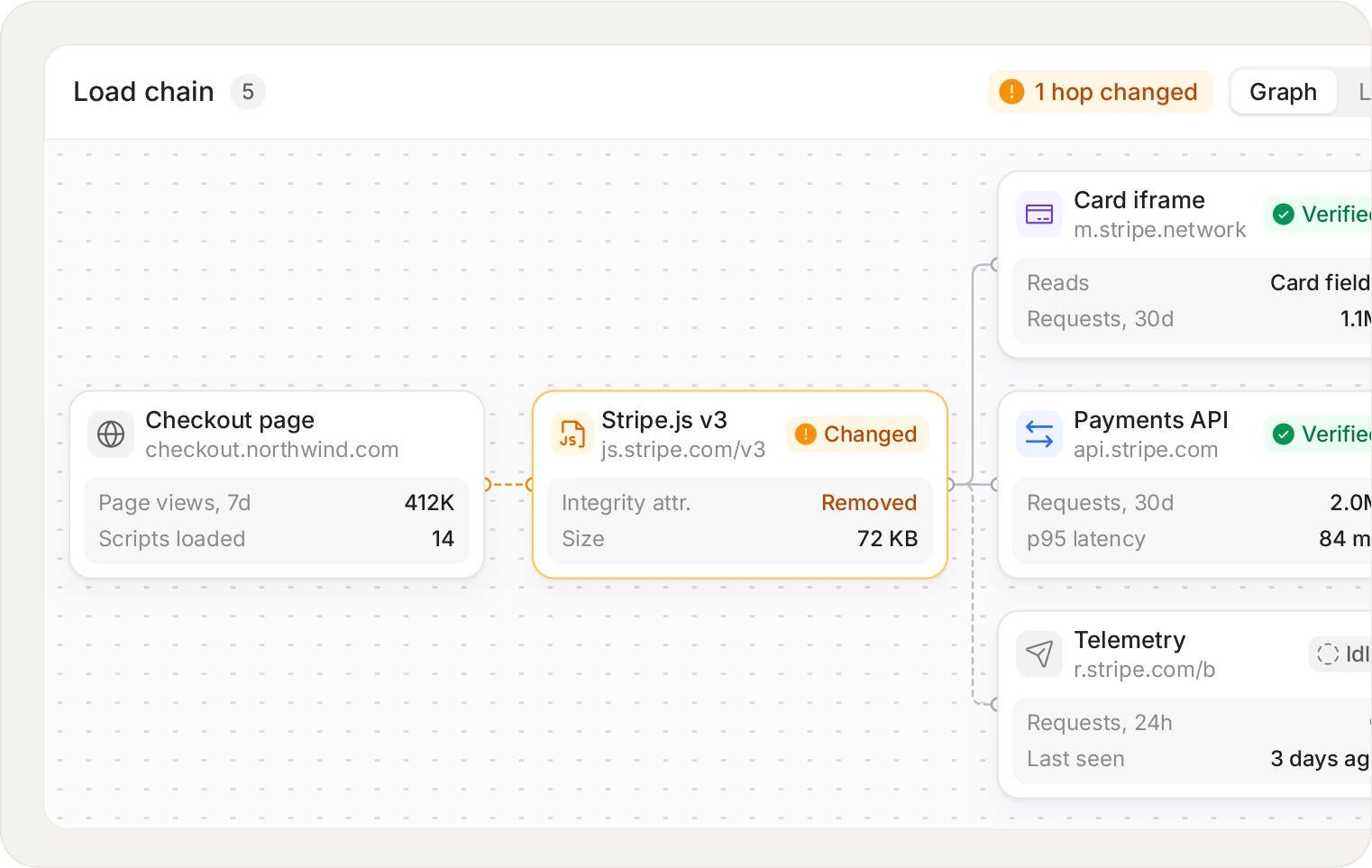
You approve a vendor, the vendor loads its own vendors. 6.4.3 applies to every script that executes, not only the ones you added yourself.
Where the line sits
Area
Shopify
You
Payment processing infrastructure
Yes
Card data storage and transmission
Yes
Platform patching and hosting
Yes
Apps you install
Yes
Theme and custom storefront code
Yes
Tag manager and marketing scripts
Yes
Admin and staff account access
Yes
Scripts executing at checkout (6.4.3)
Partly, for its own
Yes, for everything you added
Where 6.4.3 lands on Shopify
Historically Shopify's checkout was tightly locked down, which limited what could run there and was a genuine security benefit. Checkout extensibility, and custom checkout on Plus, changed that: more merchants can now put their own code on or near the checkout, and that code is in scope. One name clash worth clearing up: Shopify Scripts, the Ruby customisations Shopify switched off on 30 June 2026 in favour of Shopify Functions, ran on Shopify's servers rather than in the customer's browser, so they were never part of a 6.4.3 inventory.
The practical questions: does your store use checkout extensions, do any apps inject script into the checkout or order status page, and do your marketing tags fire on cart and checkout. Each 'yes' adds scripts you now need to inventory and justify.
Start from what actually executes on cart and checkout.
Apps are the main source
A Shopify app that adds a storefront feature usually does so by injecting JavaScript. You approved the app; you did not review the script, and you certainly did not review anything that script loads afterwards. Review widgets, upsell tools, chat, analytics and loyalty apps all add code to pages customers reach on the way to paying.
Uninstalling an app does not always remove its script tags. Orphaned script tags from removed apps are common, which is a specific and very findable form of shadow code.
What to actually do
Inventory what executes on cart, checkout and order status pages, starting from real sessions rather than from your app list
Remove orphaned script tags from apps you have uninstalled
Write a business justification per script, which will remove several more
Enforce MFA on every staff account with admin access
Confirm your SAQ type with your acquirer, because it depends on your checkout configuration
Sources and methodology
PCI DSS requirement text is quoted from PCI DSS v4.0.1 (June 2024), published by the PCI Security Standards Council, which is the current version at the time of writing. Requirements 6.4.3 and 11.6.1 became mandatory on 31 March 2025. Where we describe a competitor, we describe publicly available information and say so when something should be verified with the vendor. We publish this product and that is a bias worth knowing about while you read. Primary sources: Shopify's Scripts deprecation notice.
ASK AN AI
Don’t just take our word for it
Ask your assistant what to look for in a tool for PCI DSS 6.4.3 and 11.6.1.
Frequently asked questions
No. Shopify is compliant as a service provider, which covers its infrastructure and payment handling. Your own obligations cover what you add: apps, theme code, tags and admin access.
Commonly SAQ A, and it depends on your configuration and your acquirer. Stores using Shopify Payments with the standard checkout are usually at the simpler end. Custom checkout or extensive checkout extensions can change that, so confirm rather than assume.
Yes, this is the main way merchants acquire obligations. Apps inject JavaScript into your storefront, and any of that executing on a page where a cardholder enters card data is in scope for 6.4.3.
Yes, through the theme, through checkout extensions where your plan supports them, or through your tag manager. The specifics depend on your plan and checkout configuration, so it is worth confirming during setup.
Worth checking. It often carries more third-party scripts than the checkout itself because merchants add marketing and analytics there, and whether it is in scope depends on whether card data is displayed or entered.
Yes, frequently, and it is one of the easier findings to act on. Orphaned script tags from removed apps keep loading and keep costing page weight, with nobody owning them.
Yes, generally more of this is yours. Plus offers greater checkout customisation, and more customisation means more of your own code near the payment step and a larger 6.4.3 scope.
Partly, and it is harder on a hosted platform where you control less of the header configuration. Where you can set one it is worth doing. Monitoring is usually the more practical control here.
Uncomfortably, largely you. You chose to install it on your store. The app developer has obligations too, and your acquirer's relationship is with you, which is why reviewing what apps do on checkout matters.
By looking at what actually executes rather than at the app list. Many apps inject more than their description implies, and some load third-party code of their own.
Not directly. Shopify Scripts were Ruby customisations for discounts, shipping and payment methods that ran on Shopify's servers, not JavaScript in the customer's browser, so they were never in a 6.4.3 inventory. Shopify stopped running them on 30 June 2026 and replaced them with Shopify Functions, which also run server-side. If the migration added a checkout extension or a new app to rebuild the same behaviour, that new code is what to check.
Related articles
Platforms
Magento and Adobe Commerce PCI compliance
Why Magento checkouts were the original Magecart target, and what to do about it now.
PCI DSS
PCI DSS compliance: a practical guide for 2026
What the standard covers, what changed in v4.0.1, and where the two client-side requirements fit.
PCI DSS
PCI DSS 4.0.1 requirements: what changed and when
The changes that matter, the dates that already passed, and the two requirements most teams missed.
PCI DSS
How to comply with PCI DSS 6.4.3 and 11.6.1
A step-by-step method, from defining payment-page scope to handing an assessor the evidence.
See every script on your own checkout.
Install the tag, mark your payment pages, and watch the inventory fill in. Free forever on 1,000 page views a month, no credit card.
Free forever plan. No credit card.