Tag manager security
A container is a supported, audited, well-documented way to run arbitrary JavaScript on your payment page without a code review. Secure it accordingly.
TL;DR
Tag manager security
THE CORE ISSUE
A tag manager exists to inject arbitrary JavaScript without a deploy. Access to it is equivalent to the ability to ship code, without the review real deploys get.
WHERE IT GOES WRONG
Over-permissioned accounts, no MFA, no publish review, and containers nobody audits because marketing owns them and security does not look.
WHAT TO DO
Least privilege, MFA, a publish approval workflow, and monitoring what the container actually publishes rather than what it is configured to publish.
Short on time? The person who can publish a container can put a script on your checkout.
Why is a tag manager a security risk?
A tag manager is a system whose purpose is to inject arbitrary JavaScript into your pages without a code deployment, so anyone who can publish a container can run code on your checkout. This is not a flaw, it is the product working as designed, and it is why tag managers are useful. The risk comes from the governance gap around them: the container is usually owned by marketing, the publishing permissions are often broader than anyone realises, there is frequently no approval step, and the security team may not know the container exists. A compromised tag manager account is equivalent to compromised deploy access, with none of the review that a real deploy would attract.
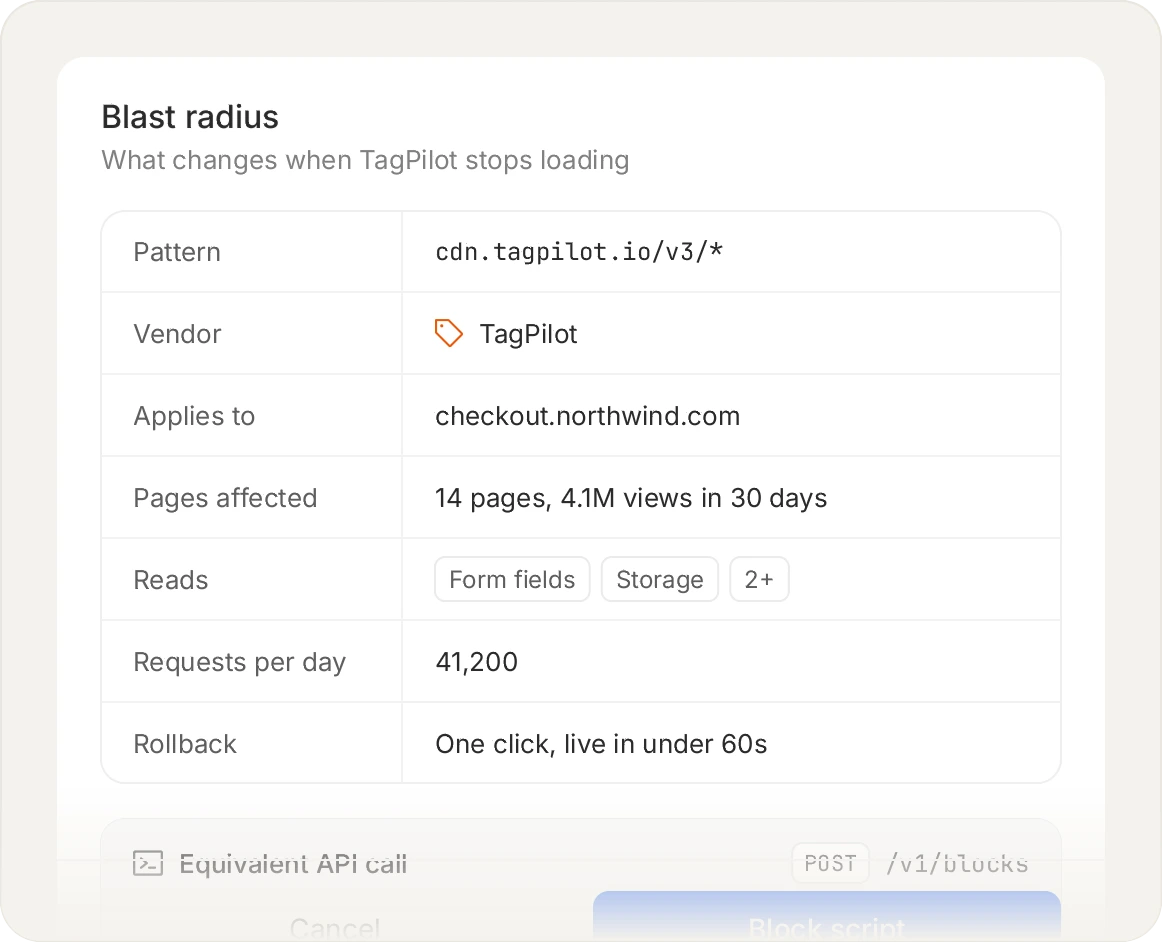
Blocking by hash pins the exact payload you approved, so a vendor that ships new code has to be re-approved rather than silently inherited.
How it is abused
Two patterns. The first is credential compromise: an attacker phishes an account with publish rights and adds a tag. The second is an over-permissioned insider or agency account, where someone who should have been able to edit a single tag can publish the whole container.
In both cases the injected script arrives through a legitimate channel. It loads from the tag manager's own domain, which is on every allowlist and in every CSP, so nothing about the delivery looks wrong.
Who can publish to your container
Access tends to grow quietly. Marketing agencies are given publish rights so they can move quickly, contractors keep them after a project ends, and the security processes and staff turnover on their side are outside your view. Each of those accounts can put JavaScript on your payment page.
What gets published is rarely one script. A tag loads a vendor script, which loads its own dependencies, which can load more again. The container shows the first link in that chain; the browser runs all of it.
Hardening the container
1
Enforce MFA
On every account with any access, without exception. This is the single highest value change and it is usually available in the platform already.
2
Least privilege
Most users need read or edit, not publish. Publish rights should be a short list of named people.
3
Approval workflow
Require a second person to approve a publish. Available in the enterprise tiers of the major platforms, and worth the upgrade for a container on a payment page.
4
Audit accounts quarterly
Agencies, contractors and former staff accumulate. The list is almost always longer than expected.
5
Separate containers by risk
A container that fires on the checkout should not be the same container marketing uses for campaign experimentation.
6
Restrict custom HTML tags
Custom HTML is the mechanism that allows arbitrary script. Limiting who may create one narrows the blast radius considerably.
A container shows what is configured. The page shows what actually ran.
Platform specifics
Platform
What to check
Google Tag Manager
User permissions at account and container level, MFA on the Google accounts, environment separation, approval workflow where available, and who may create Custom HTML tags
Adobe tag manager (Adobe Experience Platform Tags, formerly Launch and DTM)
Rights in the Admin Console, publishing workflow and approvals, and which extensions are installed and by whom
Tealium iQ
Publish permissions per profile, the approval workflow, and which extensions can execute arbitrary JavaScript
The specifics differ and the questions are the same: who can publish, is there an approval step, is MFA enforced, and who reviews the list of people with access.
Monitor what is published, not what is configured
Container configuration and page reality diverge. A container shows the tags configured in it; it does not show what those tags loaded afterwards, and it does not show anything injected by another route. Monitoring the page itself catches both, and it catches a malicious container publish regardless of how the attacker obtained access.
This is also what PCI DSS 6.4.3 requires: the inventory covers every script that executes on the payment page, including everything a container introduced.
Sources and methodology
PCI DSS requirement text is quoted from PCI DSS v4.0.1 (June 2024), published by the PCI Security Standards Council, which is the current version at the time of writing. Requirements 6.4.3 and 11.6.1 became mandatory on 31 March 2025. Where we describe a competitor, we describe publicly available information and say so when something should be verified with the vendor. We publish this product and that is a bias worth knowing about while you read.
ASK AN AI
Don’t just take our word for it
Ask your assistant what to look for in a tool for PCI DSS 6.4.3 and 11.6.1.
Frequently asked questions
Yes, if the container fires on the payment page. Publish access allows arbitrary JavaScript on that page, and JavaScript on a page can read any input on it. That is why publish rights on a container that touches checkout should be treated like production deploy rights.
Partly, and it is a real trade-off. The safest position is no container on the checkout, which many organisations find operationally impossible. The workable middle ground is a separate, tightly controlled container for payment pages with a short publish list and an approval step.
Partly, and less than you would hope. A CSP can restrict which origins the container may load scripts from. In practice policies are often written permissively to accommodate the container, which is exactly the loophole an attacker with container access would use.
Two passes. Review the access list and remove everyone who does not need publish rights. Then compare what the container claims to publish against what actually executes on the page, because the two diverge more often than teams expect.
This is the main mechanism: Custom HTML permits arbitrary script. Most legitimate tags do not need it, so restricting who can create one narrows the risk substantially without much friction.
Yes, generally in enterprise tiers. Requiring a second person to approve a publish is one of the most effective controls available, and for a container on a payment page it is usually worth the upgrade.
They are a common gap. Agency accounts frequently retain publish rights long after an engagement ends. Quarterly access review usually finds several.
Partly, from the container's own version history, which is useful if the attacker did not also have the ability to alter it. Monitoring the page is the more reliable answer, because it observes the outcome regardless of how it was introduced.
Yes, as a platform. The risk is not in the platform's security, it is in how it is configured and who has access. The same is true of Adobe and Tealium.
Yes. 6.4.3 covers all scripts loaded and executed in the consumer's browser on a payment page, regardless of the mechanism that introduced them. Everything your container loads belongs in the inventory.
Related articles
Technical
Content Security Policy: a complete guide
What a CSP does, how to deploy one without breaking your site, and the gap it leaves open.
Technical
CSP vs script monitoring: two controls, different jobs
One governs where scripts come from. The other governs what they do. You want both.
Technical
Subresource Integrity: what SRI solves and what breaks
Why SRI is excellent for static assets and almost unusable for third-party tags.
Technical
JavaScript security: the client-side threat model
What actually goes wrong in the browser, and which controls address which failure.
See every script on your own checkout.
Install the tag, mark your payment pages, and watch the inventory fill in. Free forever on 1,000 page views a month, no credit card.
Free forever plan. No credit card.