What is script monitoring?
The term covers three different jobs, from cron jobs to synthetic browser tests to security. This is the security one, defined plainly, with what it should and should not do.
TL;DR
Script monitoring
WHAT IT IS
A continuous record of the JavaScript that actually executes in your visitors' browsers, and of every change to it.
WHAT IT CATCHES
New scripts, changed scripts, scripts loaded by other vendors, and scripts that read forms or send data somewhere new.
WHY IT EXISTS NOW
PCI DSS 6.4.3 & 11.6.1 made it a requirement for payment pages from 31 March 2025.
Short on time? If you take card payments on a web page, script monitoring is how you prove what ran on it.
What is script monitoring?
Script monitoring is the continuous observation of every JavaScript file that executes on your web pages, as your real visitors' browsers receive it: which scripts ran, where each came from, which script loaded it, whether its contents changed, and what it did on the page. A script monitor turns that observation into an inventory you can review, alerts when something new or changed appears, and a record you can show an assessor. It exists because almost everything on a modern checkout is loaded at runtime from someone else's server, so your own code review and your server-side security tools never see it.
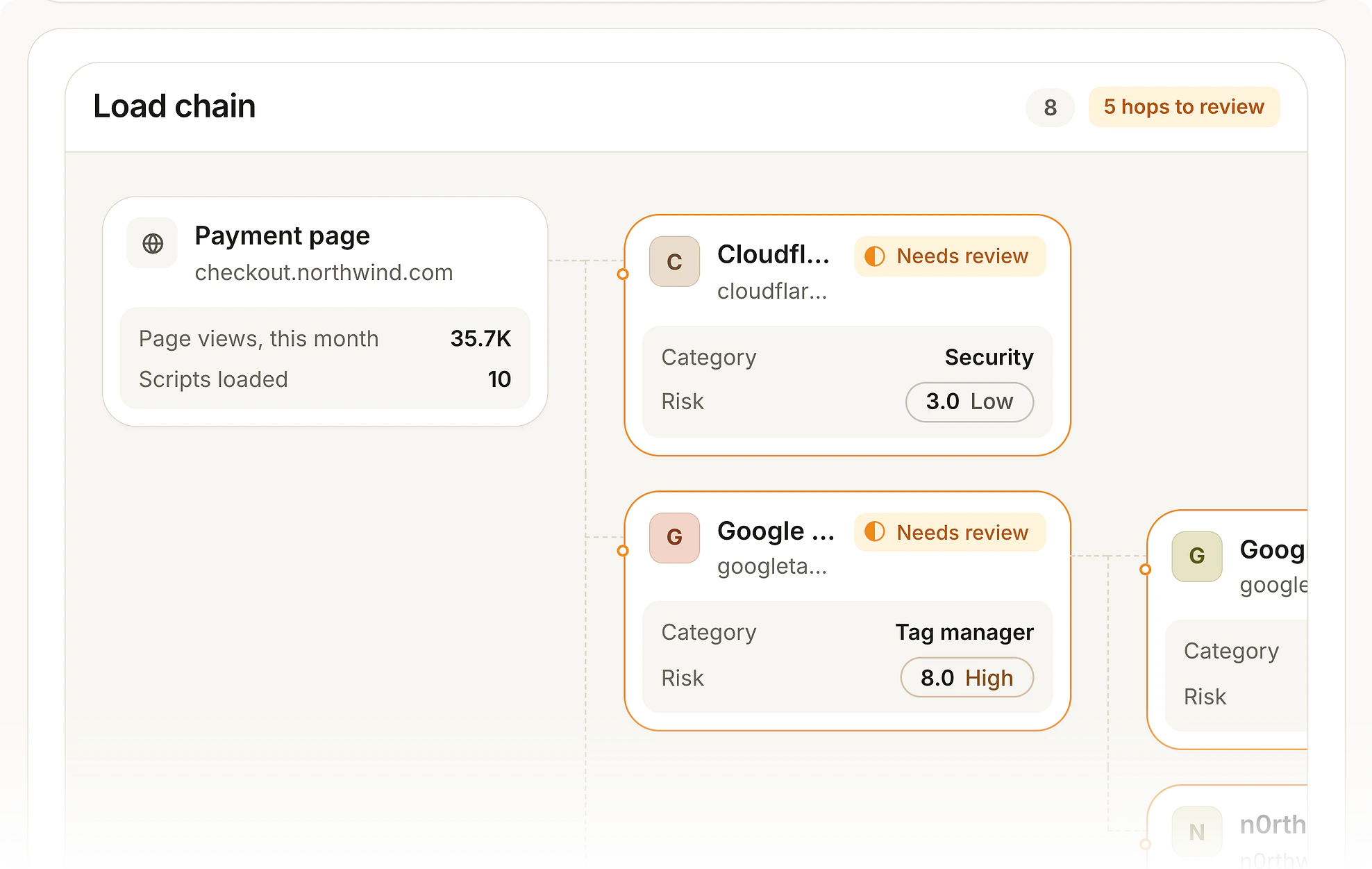
You approve a vendor, the vendor loads its own vendors. Script monitoring records the whole chain, not only the tags you added.
Three things called a script monitor
The phrase is used for three unrelated jobs, and search results mix them up. It helps to know which one you need before comparing tools.
Job and cron monitoring. Checks that a scheduled server script ran on time and exited cleanly. Heartbeat services do this. Nothing to do with browsers.
Synthetic monitoring. A scripted headless browser walks through your site on a schedule to check that it works and is fast. Useful for uptime, but it sees one simulated visit from a datacentre.
Security script monitoring. Records the third-party and first-party JavaScript that real visitors' browsers execute, and alerts on changes. This is the meaning in PCI DSS and the subject of this page.
If your question is about card data, skimming or PCI DSS, it is the third. Our JavaScript monitoring page sets out how the security kind differs from front-end error and performance monitoring.
What script monitoring records
A useful script inventory has one entry per script that actually executed, not per tag someone remembers adding. Each entry should carry:
Identity: the script URL, or a stable identity for inline code
Origin and load chain: the domain it came from and which script loaded it, so a fourth-party script is traced back to the vendor you approved
Integrity: a fingerprint of the contents, because a file can change without its URL changing
Behaviour: whether it reads form fields and where it sends requests
Decision: approved with a written justification, needs review, or blocked, with who decided and when
First and last seen: which matters most after an incident
The payment-page script inventory guide goes through each field and how to write justifications that hold up.
How script monitoring works
There are four common ways to collect the data. They are not equivalent, and most mature programmes combine two.
Content Security Policy reporting. The browser reports resources that break your policy. Cheap and built in, but it reports domains, not contents, and only what your policy forbids. See CSP vs script monitoring.
Periodic scanning. A crawler loads your pages on a schedule and records the scripts. Easy to start, but it sees what a datacentre visitor gets, and skimmers are routinely written to hide from exactly that.
An in-page tag. A small script on your pages observes what loads in real sessions and reports it. This sees what customers actually receive, including scripts that only fire for some visitors.
A proxy. Third-party scripts are rewritten to load through the vendor's servers so they can be inspected. Thorough, but it puts a dependency in the path of every script.
Script Monitoring uses the third approach: one first-party tag, added like any other script, with no DNS or CDN change and no traffic routed through us. Deep analysis of each third-party script happens off the page. The platform architecture page explains what runs where.
See what is running on your own checkout this week.
Script monitoring and PCI DSS 6.4.3 & 11.6.1
PCI DSS v4.0.1 has two requirements that, in practice, call for script monitoring on payment pages. Both have been mandatory since 31 March 2025.
Requirement 6.4.3 asks for an inventory of every script on the payment page, a written justification for each, a way to confirm each one is authorised, and a way to assure its integrity.
Requirement 11.6.1 asks for a mechanism that detects unauthorised changes to the payment page and its HTTP headers as received by the consumer's browser, and alerts personnel, at least once every seven days.
The two are assessed separately, so it helps when a tool keeps them as separate records. Our step-by-step guide covers scope, inventory, justification, integrity, change detection and evidence.
What to look for in a script monitoring tool
It records what executed in real sessions, not only what a scanner was served
It follows the load chain, so scripts your vendors load are attributed to them
It fingerprints contents, so a changed file under the same URL raises an alert
It covers HTTP headers as well as scripts, because 11.6.1 names them
It alerts a person, and keeps a record that someone reviewed the alert
It can block a script when you decide to, and can run in monitor-only mode until then
It produces evidence your assessor will accept, without a week of screenshots
For a vendor-by-vendor view, see best client-side security tools, which includes our own product and says so.
In the docs
How to do this in Script Monitoring: Quickstart installs the tag, Payment pages sets your PCI scope, and Vendors is where each script is approved or blocked.
Sources and methodology
PCI DSS requirement text is from PCI DSS v4.0.1 (June 2024), published by the PCI Security Standards Council, which is the current version at the time of writing. Requirements 6.4.3 & 11.6.1 became mandatory on 31 March 2025. Descriptions of collection methods are general and not about any one vendor. We publish a script monitoring product and that is a bias worth knowing about while you read. Primary sources: PCI SSC document library, MDN: Content Security Policy.
ASK AN AI
Don’t just take our word for it
Ask your assistant what to look for in a tool for PCI DSS 6.4.3 & 11.6.1.
Frequently asked questions
Script monitoring is the continuous observation of every JavaScript file that executes on your web pages in real visitors' browsers: which scripts ran, where each came from, what loaded it, whether its contents changed, and what it did. It turns that into an inventory, alerts and an evidence record.
In security, a script monitor is the tool that does this: it watches the scripts on your pages and tells a person when a new one appears or an approved one changes. The same words are also used for cron and heartbeat checks on server scripts, and for synthetic browser tests, which are different jobs.
Mostly. "JavaScript monitoring" is also used for front-end error and performance tools, which watch whether your code works rather than whether a script should be there. See JavaScript monitoring for the difference.
The same discipline applied to scripts you did not write: analytics, tag managers, chat, A/B testing and anything those load. It is usually where the risk is, because a vendor can change its code at any time. See third-party script monitoring.
For payment pages, effectively yes. Requirement 6.4.3 needs an inventory, a justification and integrity assurance for every script, and 11.6.1 needs change and tamper detection on the page and its HTTP headers at least every seven days. PCI DSS names the control, not a product, so you can build it yourself or buy it.
Not on its own. A CSP decides which domains may load scripts and can report violations, but an allowed domain can serve changed code and CSP will not notice. It is a good layer underneath monitoring. See CSP vs script monitoring.
A scanner gives you a periodic snapshot of what it was served. That is useful, but skimmers often target only real shoppers, so a scanner can miss what customers receive. Our PCI DSS 11.6.1 page covers what assessors look for.
It should not. A monitoring tag loads asynchronously and the heavy analysis belongs off the page. Ours is one first-party tag and is fail-open, so if it cannot load, your checkout still works.
Some tools only alert. Script Monitoring can also block a script by its URL, its host or its domain, and can run in monitor-only mode first so nothing is blocked until you decide. See block rules.
Most vendors in this category quote rather than publish. Ours is published: free for 1,000 page views a month, and paid plans from $99/month for 100,000 payment-page views. See pricing.
Related articles
Technical
JavaScript monitoring, the security kind
Which scripts execute, whether the payload changed, what they touch and where they send data.
PCI DSS
How to build a payment-page script inventory
Start from what actually executed, capture the load chain, write justifications per script.
Technical
CSP vs script monitoring
What a Content Security Policy controls, what it cannot see, and how the two fit together.
Technical
Third-party script monitoring
Monitor every third-party script, including the ones your vendors load.
See every script on your own checkout.
Install the tag, mark your payment pages, and watch the inventory fill in. Free forever on 1,000 page views a month, no credit card.
Free forever plan. No credit card.