The DebugBear incident: how a monitoring script became a wallet drainer
A trusted performance script was used to drain Polymarket users. What happened, why server-side security missed it, and how to watch the scripts you didn't write.
TL;DR
The DebugBear incident
WHAT HAPPENED
On 29 October 2026, DebugBear's performance monitoring script served a wallet drainer to Polymarket users. About $2.5 million was traced to the attacker's wallet.
WHY IT WORKED
The script loaded from the same trusted domain, ran in visitors' browsers, and acted as the logged-in user. Servers and domain allowlists saw nothing wrong.
WHAT TO DO
Remove DebugBear RUM for now, list every third-party script on your site, and watch what each one runs, not only where it loads from.
Short on time? If you only need the checklist, skip to what to do this week.
What happened in the DebugBear Polymarket incident?
On 29 October 2026, a wallet-draining script was served from DebugBear's CDN to visitors of Polymarket, which used DebugBear's real user monitoring tag. The code used visitors' logged-in sessions to sell positions and move tokens. DebugBear confirmed a security incident, and Polymarket paused trading and is reimbursing affected users.
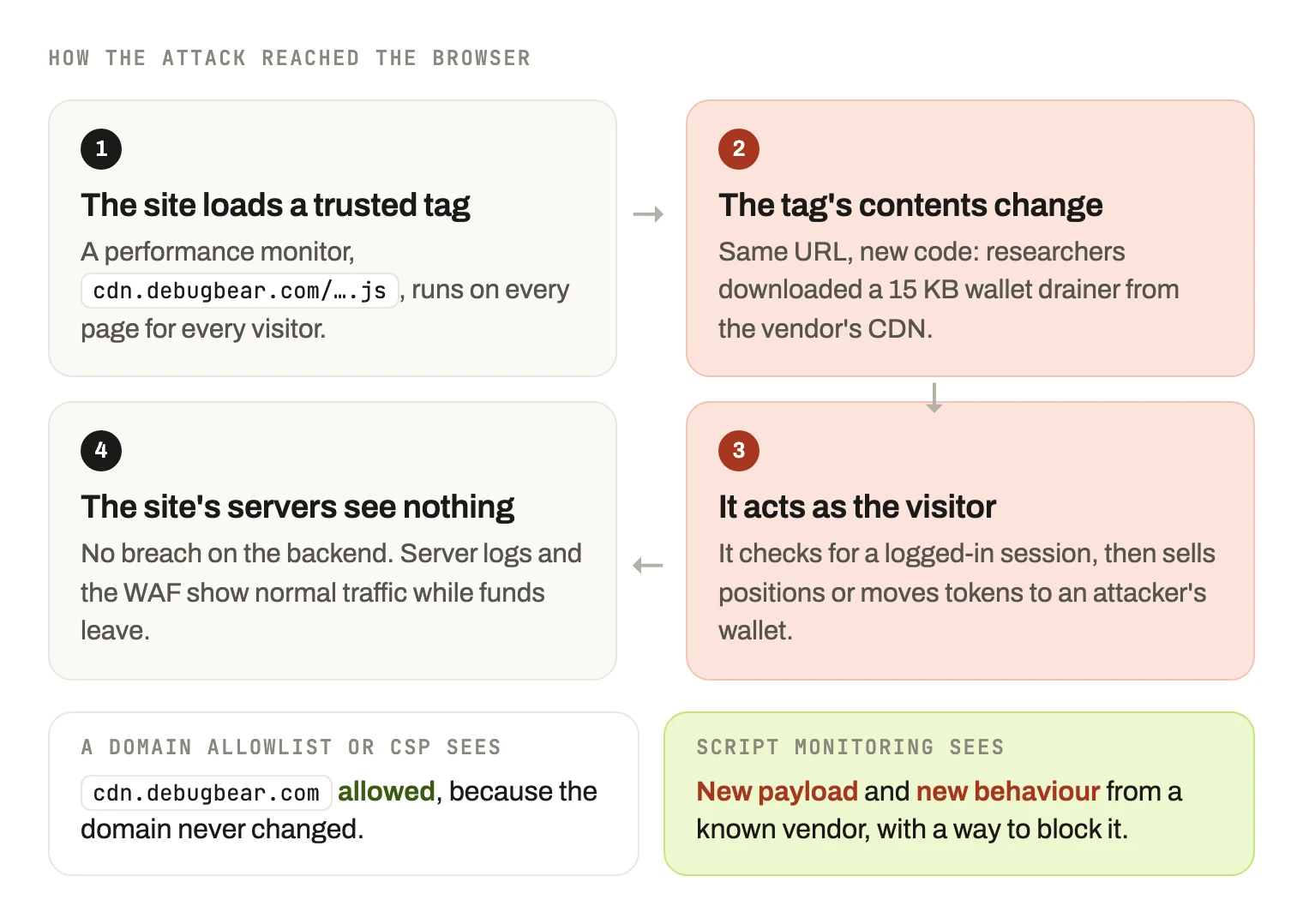
The attack in four steps. Nothing changed where the script came from, only what it contained and what it did.
What happened
Polymarket paused trading on 29 October 2026 after users reported that their accounts were being emptied. Within hours, the cause had a name few security teams would have put on a threat list: DebugBear, a website performance monitoring service.
DebugBear confirmed it the same evening: “We're impacted by an ongoing security incident. If you use our RUM product, please remove the embed code from your website.” Polymarket said that one of its third-party providers was compromised, referred the case to law enforcement, and committed to reimbursing affected traders.
The vehicle was a trusted script. Polymarket loaded DebugBear's real user monitoring snippet, a small JavaScript file that measures page speed for real visitors. Thousands of sites run tags like it.
The script's contents changed. Researchers at Hudson Rock downloaded a file from DebugBear's CDN and found a wallet drainer. It checked whether the visitor was logged in, then used that session to sell positions or move tokens to an attacker-controlled wallet.
The losses were large. Published estimates trace roughly $2.5 million to the attacker's wallet. Polymarket has not confirmed how many accounts were affected.
DebugBear has not yet said how its systems were compromised, when it started, or whether other customers received the malicious code. If you use DebugBear RUM, follow its advice and remove the embed code now.
Why this is a client-side attack
Every modern website is assembled in the visitor's browser from code you wrote and code you didn't: analytics, chat, A/B testing, tag managers, consent banners and performance monitoring. Each of those scripts runs with the same power as your own code. It can read the page, read what the visitor types, and act as the logged-in user.
Your servers never see it. The malicious code ran in the visitor's browser and talked to the attacker from there. Server logs show normal traffic, and a WAF has nothing to inspect.
The URL never changed. The script still loaded from DebugBear's own domain. An allowlist or a Content Security Policy that trusts cdn.debugbear.com allows it, because it is still DebugBear.
The vendor was legitimate. Nobody approved a malicious script. A trusted script changed underneath them.
This is the same pattern as Magecart card skimming on checkout pages, and as earlier compromises of widely used libraries and tag managers. The target here was crypto wallets instead of card numbers. The mechanism is identical: a third-party script you trust changes what it does.
What would have caught it
Client-side security means knowing, continuously, what actually runs in your visitors' browsers, and noticing when it changes. In this incident, three signals would have stood out.
1
The script's contents changed
A monitoring snippet that suddenly becomes a 15 KB drainer is a new payload, even at the same URL. Tracking every script by the hash of its contents turns “same URL, different code” into an alert.
2
The script started doing new things
A speed monitor has no reason to read session state, call trading functions or send wallet addresses anywhere. Recording what each vendor's scripts do in the browser shows the change as it happens.
3
It could be stopped without a deploy
Polymarket's fix was a code change and a redeploy. Blocking a script by URL, host or vendor from a dashboard takes effect without a release.
Subresource Integrity pins a script to an exact hash, and it would have refused the changed file. But most vendor tags, RUM snippets included, change on the vendor's schedule and cannot be pinned. That is why monitoring is needed alongside it, and why CSP and script monitoring do different jobs.
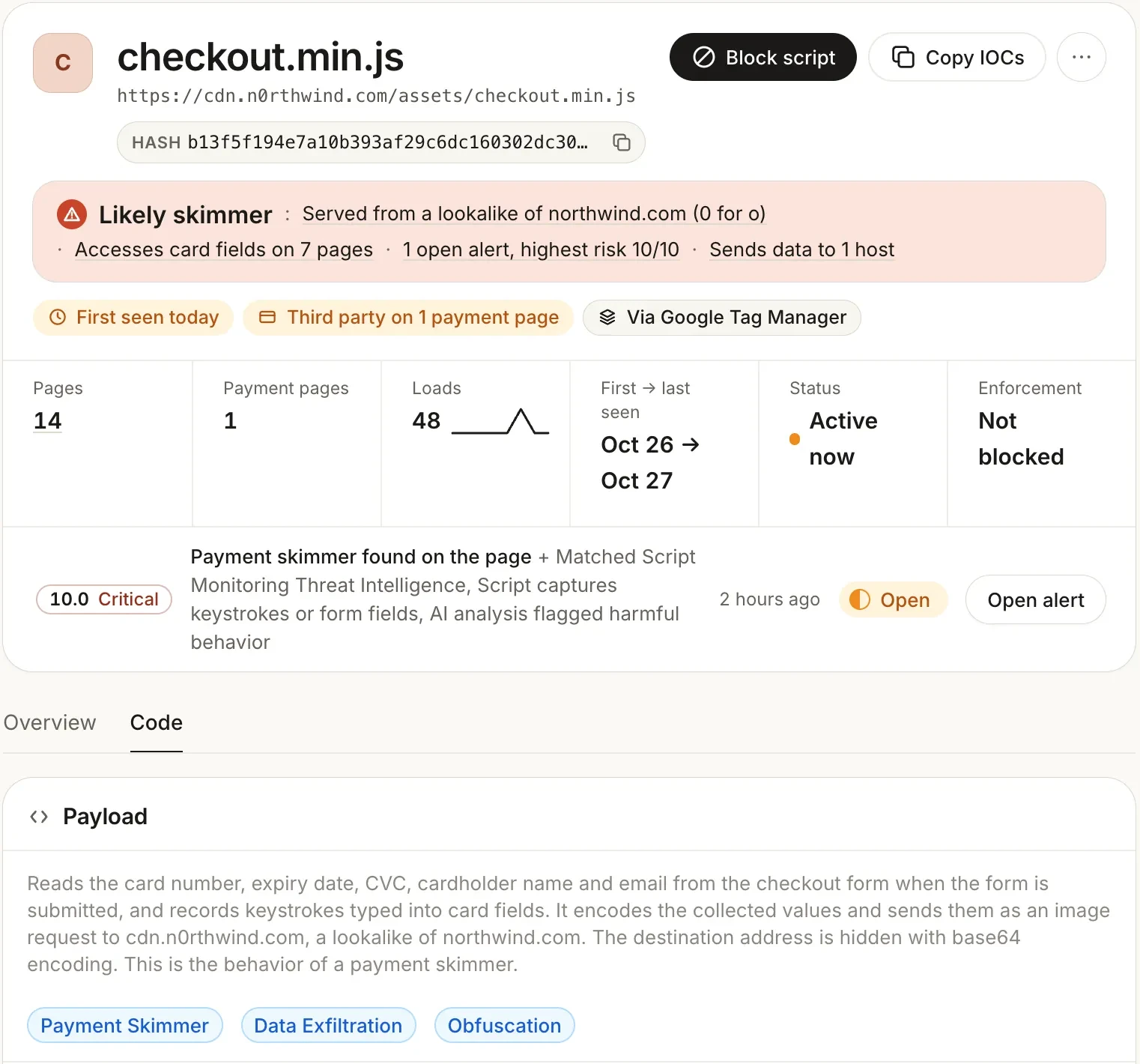
What a changed third-party script looks like in Script Monitoring (demo data): what it reads, where it sends data, the open alert, and Block script on the same screen.
Want to know what your own third-party scripts are doing today? The free plan covers 1,000 page views a month and shows every script, its payload and its behaviour.
What to do this week
Remove DebugBear RUM if you use it, until DebugBear publishes a full account of the incident.
List every third-party script on your site, including the ones loaded by other scripts and by your tag manager. Most teams find more than they expected.
Ask of each one who owns it, why it is there, and what it is allowed to do. A performance monitor does not need to read forms or act as the user.
Watch what runs, not just where it comes from. Domain allowlists and CSP decide where a script may load from. They don't tell you what the script does once it is allowed.
Make sure you can block a script without a deploy. In an incident, minutes matter.
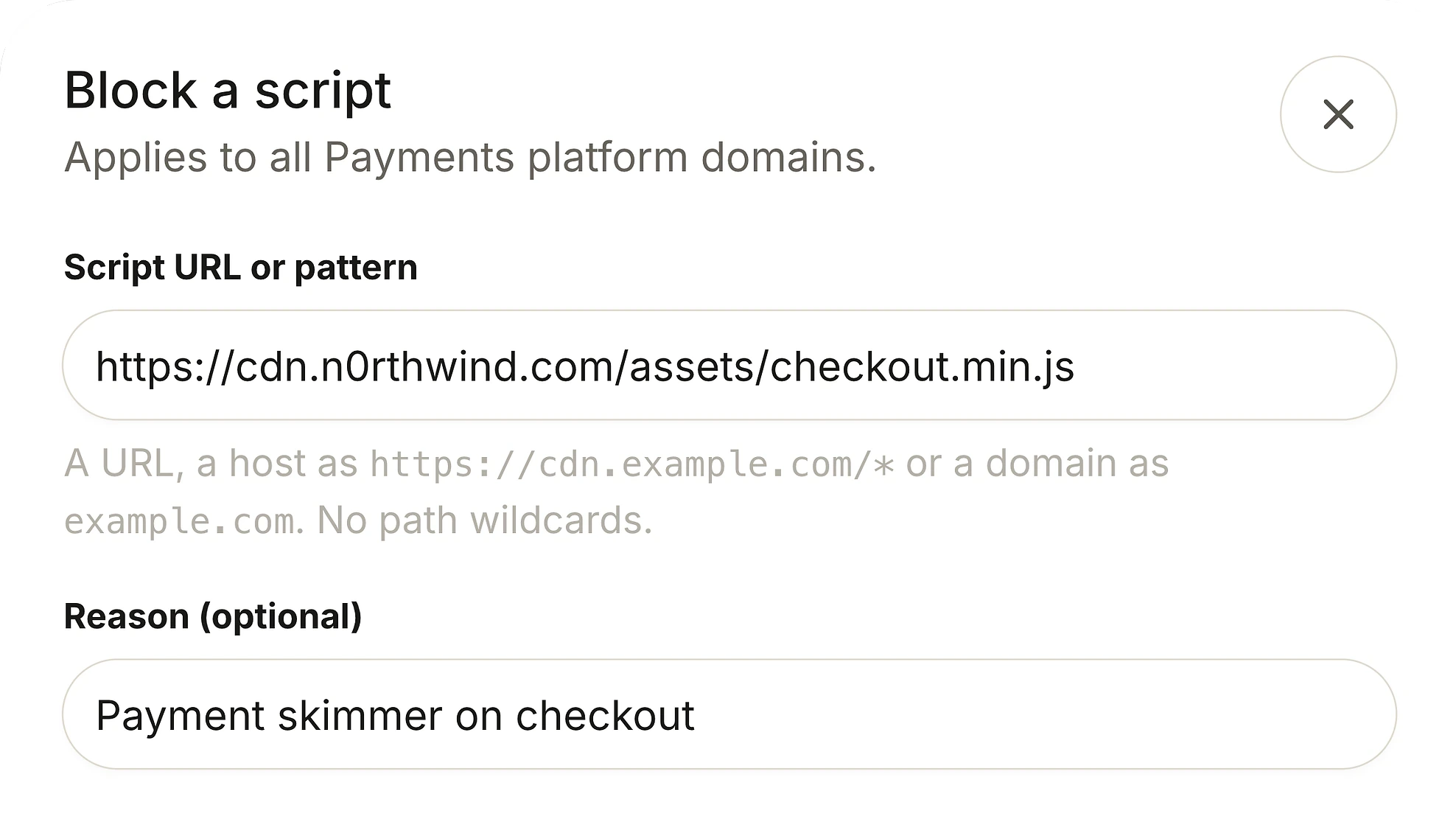
Blocking a script by URL, host or domain, with a reason. It takes effect without a release.
In the docs
Sources and methodology
DebugBear's statement is quoted from its post on X on 29 October 2026. Polymarket's statements, the trading pause and the reimbursement are as reported by BleepingComputer, Gizmodo, Reuters and Unchained. The technical details of the drainer come from Hudson Rock's analysis. Loss figures are published estimates and may change. This post was written on 30 October 2026 and will be updated when DebugBear publishes its own account.
ASK AN AI
Don’t just take our word for it
How can I tell if a third-party script on my website has been compromised?
Frequently asked questions
DebugBear said on 29 October 2026 that it is “impacted by an ongoing security incident” and asked customers of its RUM product to remove the embed code from their websites. Researchers found a wallet-draining script served from its CDN. DebugBear has not yet said how its systems were compromised.
Polymarket loaded DebugBear's real user monitoring script. That script's contents were replaced with code that checked whether the visitor was logged in, then used the session to sell prediction-market positions or move tokens to an attacker's wallet. It all ran in the visitor's browser.
Published estimates trace roughly $2.5 million to the attacker's wallet. Polymarket has not confirmed the number of affected accounts and has said it will reimburse affected traders.
Yes, for now. DebugBear itself asked RUM customers to remove the embed code. Put it back only after DebugBear publishes what happened and how it was fixed.
Polymarket attributed the incident to a compromised third-party provider. The drainer described by researchers ran in visitors' browsers through the vendor's script, which is why server-side defences had nothing unusual to see.
Not on its own. A CSP decides which domains a script may load from. The malicious code came from DebugBear's own CDN, which a site using DebugBear would have allowed.
If the script had been pinned with an SRI hash, the browser would have refused the changed file. In practice most vendor tags, RUM snippets included, change on the vendor's schedule and are not pinned, so SRI rarely covers them.
It is an attack that reaches your visitors through code you load from someone else, such as an analytics, chat or monitoring script. The attacker compromises the vendor, and every site that loads the vendor's script runs the attacker's code in its visitors' browsers.
Magecart attacks inject skimming code into checkout pages, often through a third-party script, to steal card details. The DebugBear incident used the same route to steal crypto instead of cards.
You need to record what each script contains and what it does in real visitors' browsers, and be alerted when either changes. Script monitoring tools do this continuously. Checking a script's URL or domain is not enough.
Related articles
Attacks
What is Magecart? Groups, methods and real incidents
Where the name came from, how the attacks work, and why they run for months undetected.
Technical
CSP vs script monitoring: two controls, different jobs
One governs where scripts come from. The other governs what they do. You want both.
Technical
Subresource Integrity: what SRI solves and what breaks
Why SRI is excellent for static assets and almost unusable for third-party tags.
Technical
Tag manager security: GTM, Adobe and Tealium
A tag container is a mechanism for injecting arbitrary JavaScript. Secure it accordingly.
See what your third-party scripts actually do.
Install the tag and watch every script on your pages: what it runs, what it does, and when it changes. Free forever on 1,000 page views a month, no credit card.
Free forever plan. No credit card.