Agentic Web Scanner, for the sites you can't add a tag to
Script Monitoring crawls your site on a schedule and records the scripts each page loads, so there is nothing to install. It sees what a scan sees, not every real visitor's session, so the script tag stays the stronger choice wherever you can add it.
Start for free
Talk to an expert
What is the Agentic Web Scanner?
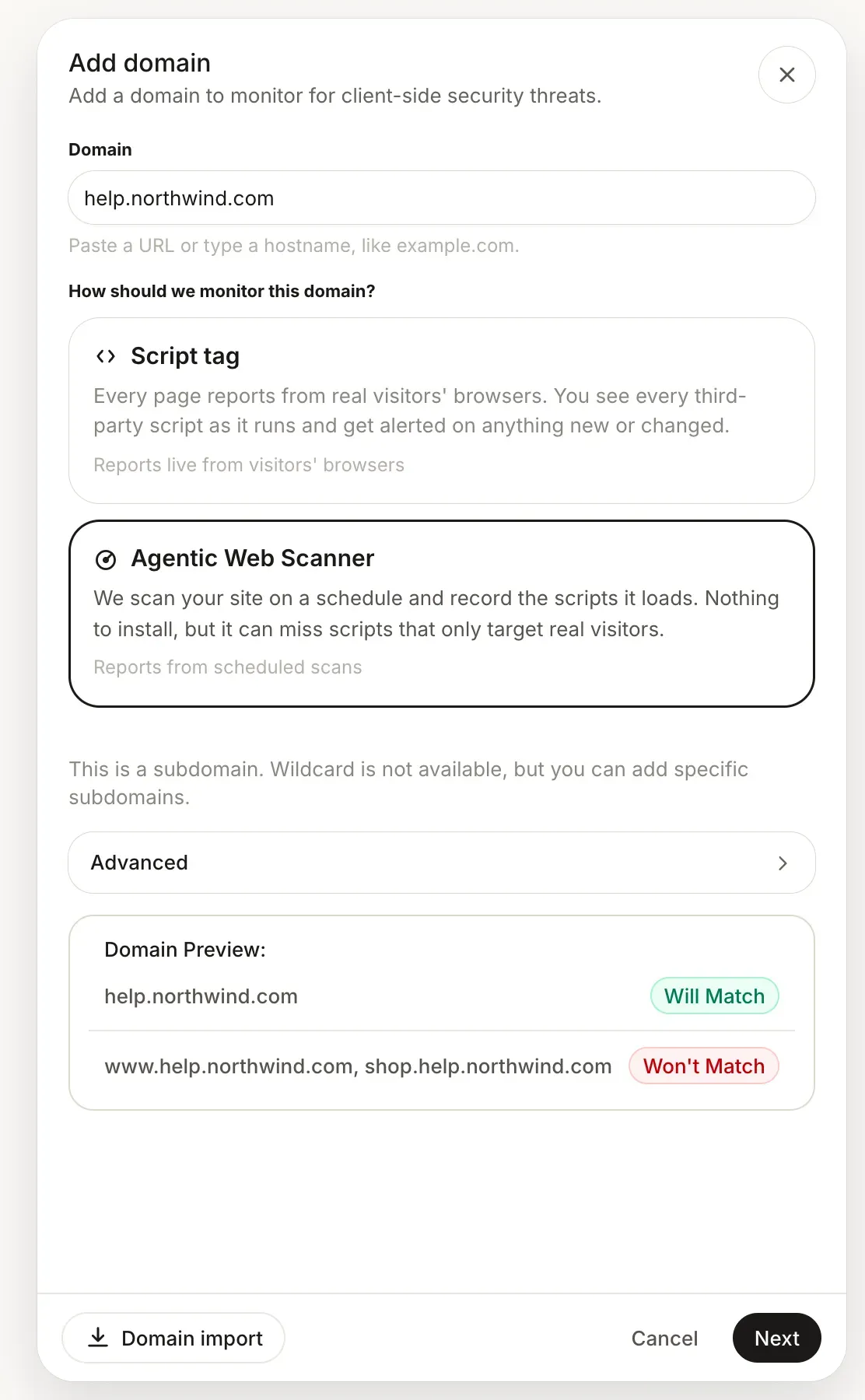
The Agentic Web Scanner is the second way to monitor a domain, for pages you can't put a tag on. With the Script tag, every page reports from real visitors' browsers as scripts run. With the Agentic Web Scanner, Script Monitoring crawls your site on a schedule and records the scripts it loads. You choose per domain when you add it, so one team can run the tag on the checkout it controls and the scanner on a site it doesn't. It is included in Pro and Enterprise.
When to choose it
When adding a script is not in your hands: a site another team or an agency runs, a page on a platform you can't edit, or a domain where a code change waits for the next release. If you can add the tag to a payment page, add the tag. It reports every real session, and the scanner can miss a script that only targets real visitors.
How it works
Add the domain in Security > Domains and choose Agentic Web Scanner. The preview shows which hostnames the scans cover, and there is nothing to install. You can also add scanner domains in bulk from a CSV file, or from your backend with the REST API.
Set the schedule, then scan
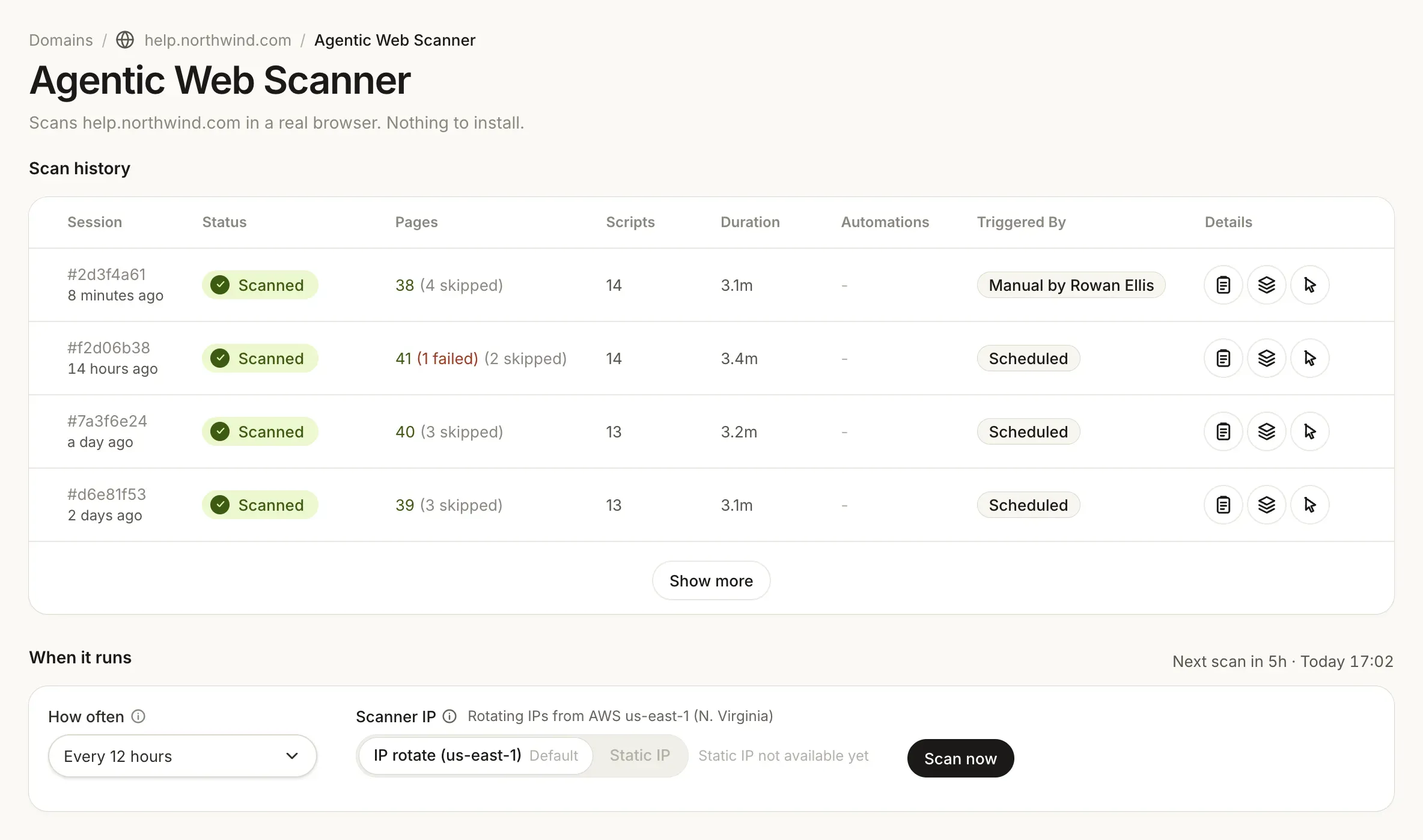
The domain's scanner settings hold how often it runs, the scanner IP and the scan history. Scan now starts a scan straight away. Scans come from rotating IPs in us-east-1, or, where a region is live, from one static IP in New York or Frankfurt that you can allow in your firewall.
Next to your tagged domains
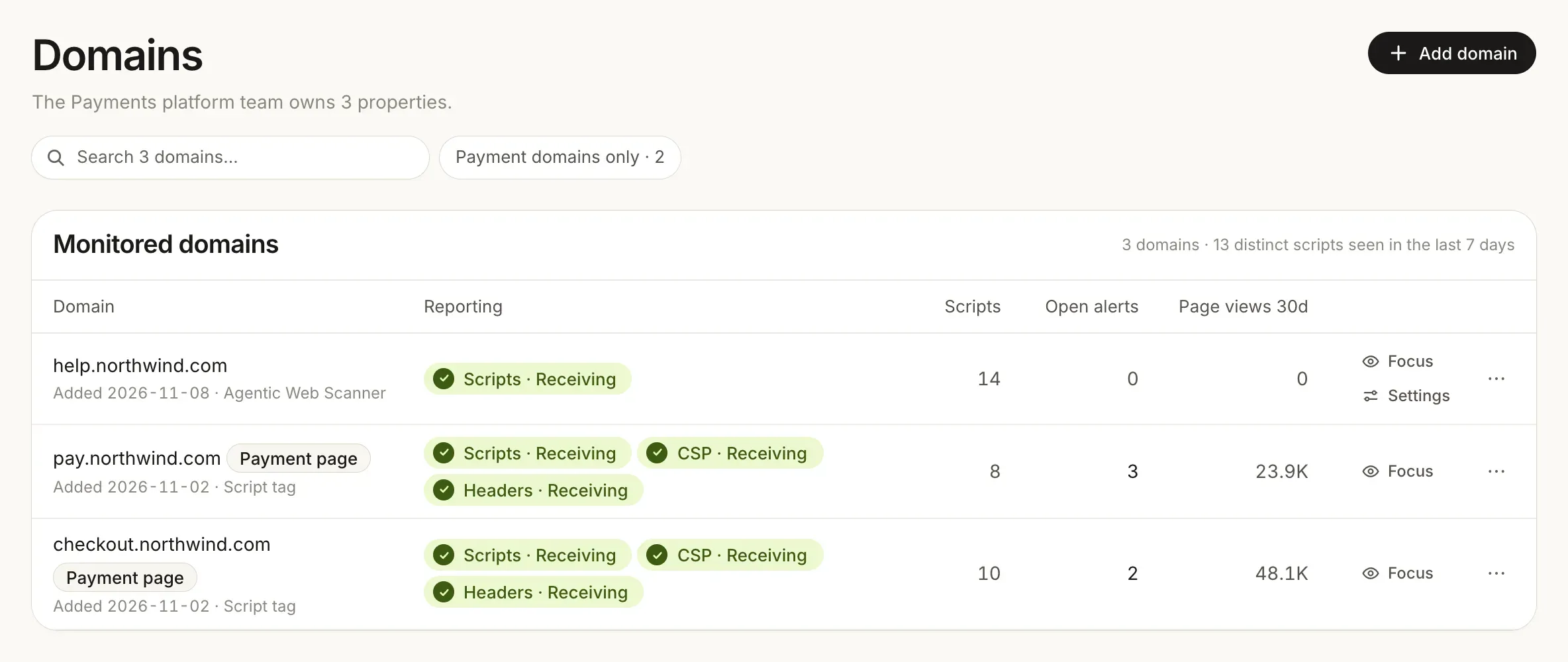
Each scan records the scripts the pages loaded, the same way the tag does. A scanner domain sits in the Domains list next to the tagged ones, with its script count and how it is monitored.
What a scan sees, and what it can miss
A scan records the scripts your pages load when the scanner visits them. A skimmer built to fire for one country, one logged-in customer or one hour may not show itself to a crawler. The script tag reports from every real session, which is why it is the default and why we recommend it on payment pages. In Diagnostics, scanner domains are listed as Scanned rather than with live streams, and a domain on a custom schedule is only flagged once a scan is overdue.
Use the tag where you can and the scanner where you can't. Both sit in the same Domains list, each marked with how it is monitored.
The Agentic Web Scanner is on Pro and Enterprise. Pro has a 14-day free trial.
Start for free
See pricing
Related platform capabilities
Script inventory
Every script, with a justification per script.
Tamper detection
Content and integrity changes on the page.
Header monitoring
Distinct values seen per header, per week.
Vendors and load chains
Who loaded whom, and from where.
How it works
One tag, in-browser reporting, off-page analysis.
Alerts
Three channels: email, webhook, or S3.
Frequently asked questions
Read the FAQ
Yes. The Agentic Web Scanner crawls your site on a schedule and records the scripts it loads, with nothing to install. It is included in Pro and Enterprise. The trade-off: it can miss scripts that only target real visitors, which the script tag would see.
For a payment page you control, the script tag is the stronger record: it reports every script from every real session, which is what an inventory and change detection are meant to cover. Where you can't add the tag, the scanner gives you a scheduled record of the scripts each page loads. Whether that is enough for your assessment is your QSA's call, so ask early.
With the Script tag, every page reports from real visitors' browsers as scripts run. With the Agentic Web Scanner, Script Monitoring crawls your site on a schedule and records the scripts it loads. Nothing to install, but it can miss scripts that only target real visitors.
It is the same idea: a crawler loads your pages instead of a tag running in visitors' browsers. The difference is that we offer both, so you choose per domain rather than choosing a vendor by method. See every comparison.
On the schedule set in the domain's scanner settings. Scan now starts a scan straight away, one manual scan a minute per domain, and its run shows up in the execution history after a few minutes.
Yes. Pick Static IP and a region, New York or Frankfurt, and the settings show the fixed IP with a copy button so you can allow it. A region that is not live yet shows Not available yet, and until you pick a live one, scans use rotating IPs in us-east-1.
Pro and Enterprise. Free monitors with the script tag, on 1,000 page views a month. A Free team that has never had a trial gets 14 days of Pro. See pricing.
Yes. Your server sends CSP reports to the scanner domain's own endpoint. Copy it from the CSP reporting sheet in the dashboard, because reports sent to the wrong endpoint are discarded.
Monitor a site you can't add a tag to.
Add the domain, choose Agentic Web Scanner, and see the scripts its pages load. Pro starts with a 14-day free trial.
Free forever plan. No credit card.